Writing YouTube Shorts titles, hashtags and descriptions (October 2026)
Shortsmith team · Updated
Put the most important words at the start of a Shorts title, and keep it short and accurate to the video. Hashtags can go in the title or the description, and up to three of the description’s hashtags with the most engagement appear next to the title. If a video has more than 60 hashtags, YouTube ignores all of them, and overdoing it can remove the video from search results.
We checked the YouTube Help Center pages “Use hashtags for YouTube” and “Thumbnail and title tips” on October 16, 2026, and we explain how Shortsmith writes titles, hashtags and descriptions with the script and fills them into the upload form.
At a glance — what YouTube says
| Item | YouTube’s guidance | What it means for Shorts |
|---|---|---|
| Title accuracy | Titles should accurately reflect the video; a mismatch leads to drop-off and lower discoverability | The opening shot must deliver what the title promises |
| Title length and order | Keep it as short as possible, most important words first, episode numbers and branding last | Phones show only the start of the title |
| Capitals and emoji | Use them sparingly, only for emphasis | Skip “!!!!” and rows of emoji |
| Where hashtags go | In the title and the description | Collecting them at the end of the description keeps things tidy |
| Hashtags shown | Up to 3 with the most engagement appear next to the title | Decide your three most important first |
| Hashtag count | Over 60 and all are ignored; too many can remove the video from search | 3–5 is plenty |
Titles — accurate, with key words first
YouTube says titles should accurately reflect what the video is about. When the title and the video don’t match, viewers drop off, and the video can become less discoverable in recommendations and search. A Short takes less than a second to swipe past, so whatever the title promises has to appear within the first three seconds.
Viewers may see only part of a title, so keep it as short as possible and put the most important words first. Move episode numbers and channel branding to the end. Save capital letters and emoji for emphasizing an emotion or something special. YouTube gives “My kids built a robot!!!!!” as an example of overdoing it.
It helps to think of two kinds of titles. A searchable title says plainly what the video covers and reaches people looking for that topic; an intriguing title leaves a question open and catches viewers who weren’t searching for anything. Shorts are mostly seen in the recommendation feed, which favors intriguing titles, but putting a searchable name (a person, team or product) at the front lets you aim for both.
A Short really has two titles. The upload title appears in search results and channel lists, while the on-screen title burned into the video is what viewers see the moment it plays in the feed. Since the on-screen title gets noticed first in the feed, keep it big and within two lines, and let the upload title lead with searchable words. Both should point to the same event so viewers aren’t confused, and both should match the opening shot so nobody swipes away.
Hashtags — three are shown, more than 60 are ignored
Hashtags can go in a video’s title and description. Up to three of the description’s hashtags with the most engagement appear next to the title, and the rest stay in the description and still count in search. Tapping a hashtag opens a results page of other videos using it. When you type in the Shorts upload flow, related hashtags are suggested, and ones you have used before show a clock icon.
Hashtags can’t contain spaces, so join two words together (#twowords). With more than 60 hashtags, YouTube ignores all hashtags on that video, and too many can remove it from uploads or search results. Unrelated hashtags, hashtags that harass people or promote hate, sexual hashtags and profanity are grounds for removal, and so is stuffing the description with plain tags or repeated sentences.
How many hashtags should a Short use?
The hard limit is 60, but only three show by the title. Three to five hashtags covering the topic, the people or product, and the niche are enough; more only dilutes relevance. You don’t need #shorts either: vertical videos up to three minutes are classified as Shorts on their own.
Descriptions — a one-line summary, credits, hashtags
The description isn’t shown on the Shorts screen right away, but it opens when viewers tap the title and it feeds search. Summarize the video in one sentence on the first line. If you used someone else’s footage, credit the source and your basis for using it (your own upload, permission, CC BY and so on). Then collect your hashtags on the last line.
Listing the same word over and over, or adding popular words that have nothing to do with the video, can break YouTube’s hashtag and metadata policies. Like the title, the description has to match the video. Crediting a source is good manners, but it doesn’t replace a copyright or fair-use assessment.
How Shortsmith writes and fills them in
When Shortsmith writes a script, it also writes several upload title options, a two-line on-screen title, hashtags and a description. Upload titles put the source’s key names (a person, team or product) first, and the second line of the on-screen title is an open loop, such as “…and then?” or “the real reason,” with the answer kept inside the video. Numbers and names that aren’t in the source are checked out of the hashtags and description too.
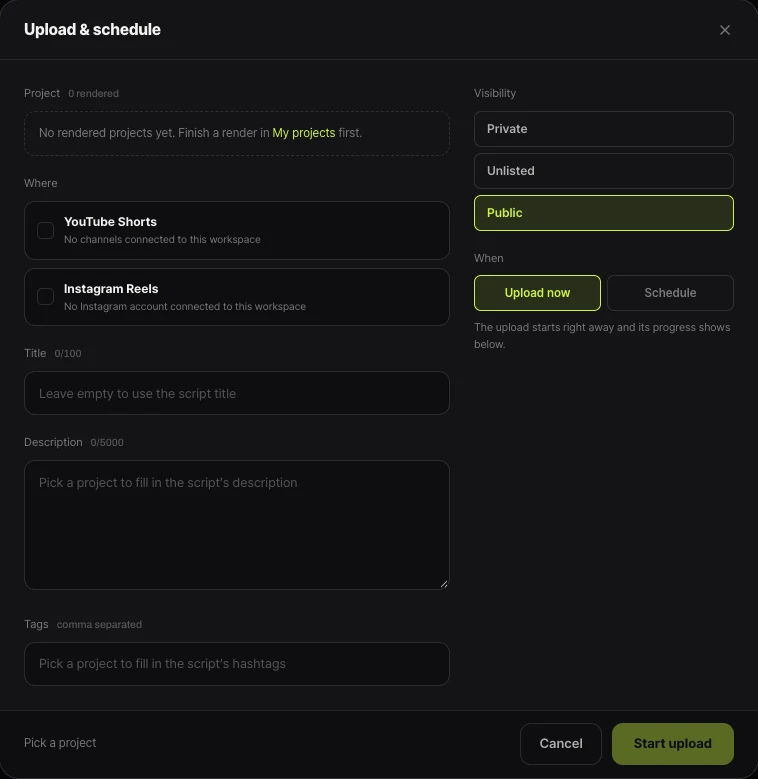
In the “Upload & schedule” window, picking a rendered project fills the title, description and tags from the script, and you can edit the title up to 100 characters and the description up to 5,000. Leaving the title empty uses the script title. You can select YouTube Shorts and Instagram Reels together in the same window.
FAQ
How many hashtags can a Short have?
Over 60 and YouTube ignores all of them on that video. Only the top three by engagement show next to the title, so three to five is plenty.
Do I need the #shorts hashtag?
No. Since October 15, 2024, vertical or square videos up to three minutes are classified as Shorts. Adding it does no harm, but hashtags describing the content are more useful.
How long should a title be?
YouTube doesn’t give an exact count; it says keep it as short as possible with the important words first. Upload titles can run 100 characters, but phones show only the start.
Can I put hashtags in the title?
Yes, they work in both the title and the description. Titles read better short, though, so collecting hashtags at the end of the description is usually cleaner.
Will unrelated trending hashtags bring more views?
Hashtags unrelated to the video are grounds for removal under YouTube’s policy, and too many can remove the video from search results.
Sources
- Use hashtags for YouTube — YouTube Help · checked
- Thumbnail and title tips — YouTube Help · checked
- Understand three-minute YouTube Shorts — YouTube Help · checked