YouTube Shorts monetization requirements, explained (as of October 2026)
Shortsmith team · Updated
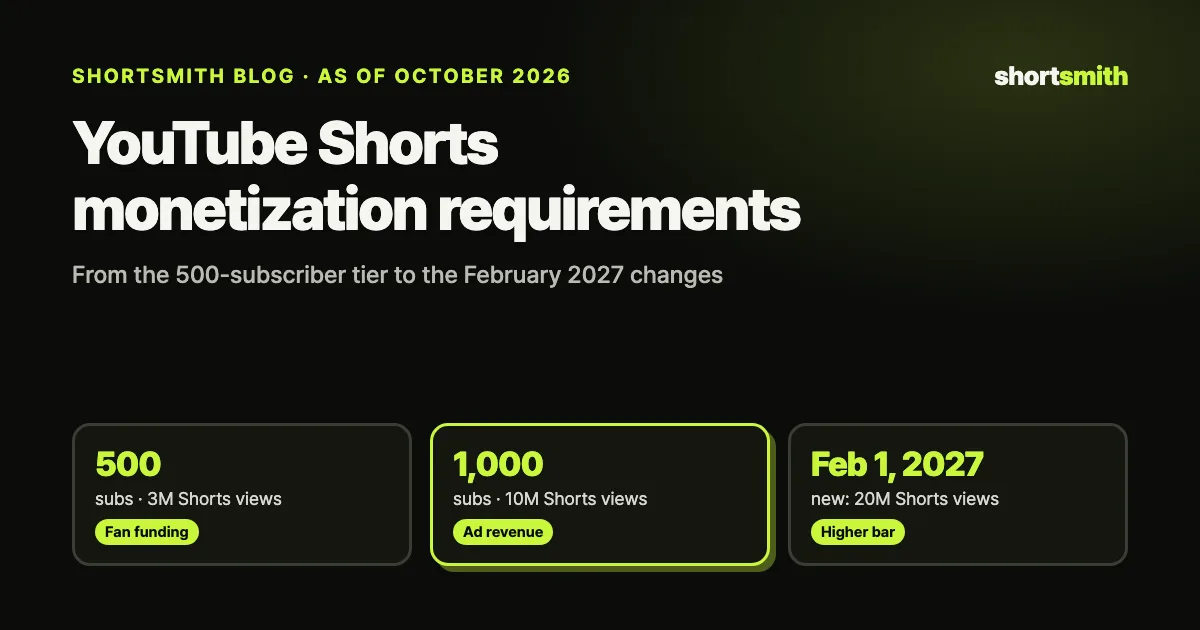
To earn ad revenue from YouTube Shorts, you need to join the YouTube Partner Program (YPP) with 1,000 subscribers plus 10 million qualified Shorts views in the last 90 days (or 4,000 watch hours on long-form videos in the last 12 months). Before that, 500 subscribers, 3 public uploads in the last 90 days and 3 million Shorts views (or 3,000 watch hours) unlock fan funding features such as Super Thanks and channel memberships, plus YouTube Shopping.
The rules change on February 1, 2027. New applicants will need 8,000 watch hours or 20 million Shorts views, and every partner — including existing ones — will only share in Shorts ad revenue in months when their last-90-day Shorts views are above 10 million. We rechecked YouTube’s Help Center and the official YouTube Blog on October 9, 2026 for this guide. Below: the requirements tier by tier, how Shorts payouts are actually calculated, what gets excluded, and a realistic way to reach the threshold.
At a glance — Shorts monetization requirements by tier
Monetization on YouTube is less a switch than a staircase. At 500 subscribers, fan funding and shopping open up; at 1,000 subscribers, ad revenue and YouTube Premium revenue sharing open up. From February 1, 2027, the bar for new channels rises, and Shorts ad revenue gets an extra monthly check. The table below copies the numbers exactly as YouTube publishes them.
| Tier | Subscribers | Other requirements | What you can earn |
|---|---|---|---|
| Early access (same now and after 2027) | 500 | 3 public uploads in 90 days + 3,000 watch hours in 12 months or 3M Shorts views in 90 days | Super Thanks, Super Chat, Super Stickers, channel memberships, Shopping |
| Ad revenue (apply by January 31, 2027) | 1,000 | 4,000 watch hours in 12 months or 10M Shorts views in 90 days | Ad revenue and YouTube Premium revenue |
| Ad revenue (new applicants from February 1, 2027) | 1,000 | 8,000 watch hours in 365 days or 20M Shorts views in 90 days | Ad revenue and YouTube Premium revenue |
| Shorts revenue sharing (from February 1, 2027, all partners) | — | 10M+ qualified Shorts views in the last 90 days, checked monthly | Shorts Feed ads and subscription revenue |
Key point
Shorts-only ad revenue takes 1,000 subscribers and 10M Shorts views in 90 days today, and 20M for new applicants from February 2027. The 500-subscriber tier unlocks fan funding and shopping — not ad revenue.
What opens up at 500 subscribers?
The expanded YouTube Partner Program accepts applications from 500 subscribers. You also need 3 public uploads in the last 90 days, plus either 3,000 qualified watch hours on long-form videos in the last 365 days or 3 million qualified Shorts views in the last 90 days. YouTube first rolled this tier out in the United States, the United Kingdom, Canada, Taiwan and South Korea, and has since been bringing it to every country where YPP is available — check the eligible-countries list in the Help Center for yours.
This tier unlocks the ways viewers pay you directly: Super Thanks on videos, Super Chat and Super Stickers on live streams, monthly channel memberships, and YouTube Shopping for your own products. There is no ad revenue yet. Realistically, the early tier is less about earning a living and more about testing how much your audience wants to support you.
The February 2027 update leaves these early-access requirements unchanged. To keep earning from fan funding and shopping, though, you have to review and accept the Commerce Product Module in YouTube Studio by January 31, 2027; otherwise those features stop earning on February 1.
- Early tier: 500 subscribers, 3 public uploads in 90 days, and 3,000 watch hours or 3M Shorts views
- Unlocks: Super Thanks, Super Chat, Super Stickers, channel memberships, YouTube Shopping
- No ad revenue at this tier — that opens at 1,000 subscribers
What do you need for ad revenue?
Ad revenue and YouTube Premium revenue sharing open at 1,000 subscribers, with one of two paths. A long-form channel needs 4,000 public watch hours in the last 12 months; a Shorts channel needs 10 million qualified Shorts views in the last 90 days. One point that trips people up: time watched in the Shorts Feed does not count toward the 4,000 hours. A Shorts-first channel should aim for the 10-million-view path from day one.
Beyond the numbers, you need to live in a country or region where YPP is available, have no active Community Guidelines strikes, and link one active AdSense for YouTube account to your channel. When you apply, a person reviews the whole channel — the Help Center says this typically takes about a month. Views and watch time from paid ad campaigns don’t count; only organic follow-on views do.
Eligibility keeps being checked after you join. According to the Help Center, YouTube may turn off monetization on channels that haven’t uploaded a video or posted to the Posts tab for six months or more. Think of monetization as a state you keep by running an active channel, not a badge you earn once.
- Open YouTube Studio → Earn to see how close you are to each threshold.
- Turn on 2-Step Verification for your Google account and create or link an AdSense account.
- Once you qualify, review and accept the YPP terms and the monetization modules (ads, Shorts, commerce).
- Wait for the review (about a month). If you’re rejected, fix the stated issues and reapply after 30 days.
What changes on February 1, 2027?
YouTube announced the Partner Program update on the official YouTube Blog on August 10, 2026, effective February 1, 2027. There are three main changes.
First, the ad-revenue entry bar doubles for new applicants. You still need 1,000 subscribers, plus 8,000 qualified watch hours in the last 365 days or 20 million qualified Shorts views in the last 90 days. Channels already in YPP keep their status.
Second, Shorts ad revenue gets its own monthly check. Only channels with at least 10 million qualified Shorts views in the last 90 days share in that month’s Shorts Feed ads and subscription revenue — and this applies to existing partners too. Falling below the line doesn’t remove you from YPP: you keep earning on long-form videos, and Shorts revenue sharing resumes automatically once you’re back above 10 million.
Third, YouTube announced new incentives for Shorts channels below the threshold: YouTube Shopping bonuses, incentives for brand deals, and earnings boosts for starting and growing trends, with details to come. YouTube Premium Lite is also expanding to every country where Premium is offered; for Shorts, creators receive 45% of the Premium revenue allocated to them.
To do
If you’re already a partner, review and accept the updated terms in YouTube Studio by January 31, 2027 to keep monetizing fully.
How are Shorts payouts actually calculated?
Shorts don’t earn from “the ad on my video” the way long-form videos do. YouTube pools the revenue from ads shown between videos in the Shorts Feed, by country, for each month, and then splits it. Step by step:
- Pool a month of Shorts Feed ad revenue per country.
- Set aside music licensing. Views of Shorts with no music send all their revenue to the Creator Pool; one track sends half, two tracks one third.
- Split the Creator Pool by each monetizing creator’s share of engaged views. Whether you used music doesn’t change your share.
- You keep 45% of your allocation — music or no music.
| Step | YouTube’s example |
|---|---|
| Monthly Shorts Feed ad revenue in one country | $100,000 |
| Music licensing (20% of Shorts used one track) | $10,000 |
| Creator Pool | $90,000 |
| Your share of engaged views (1M of 100M) | 1% → $900 |
| Creator share, 45% | $405 |
Shorts that don’t earn — views that get excluded
High view counts don’t guarantee revenue. YouTube’s Shorts monetization policies exclude views of non-original Shorts (unedited clips of other people’s shows, reuploads, compilations with nothing new added), artificial views from click or scroll bots, and views of Shorts that don’t meet the advertiser-friendly content guidelines. Shorts longer than one minute with an active Content ID claim are blocked from monetization.
Channel-level monetization policies apply too. The reused content policy covers channels that repurpose content already on YouTube or elsewhere, and requires a meaningful difference viewers can recognize between the original and your video. Edited footage where you add a storyline and commentary is listed as allowed; clips edited together with little or no narrative are not. The policy applies even if you have the original creator’s permission.
On July 15, 2025, YouTube renamed its “repetitious content” policy to “inauthentic content.” It targets mass-produced, repetitive content that looks like it was made from a template — including AI-generated content made with generic templates that doesn’t add the creator’s own insight or perspective. YouTube explicitly allows AI as a creative aid, such as editing your script or generating a unique background.
- Excluded views: non-original Shorts, artificial views, Shorts that aren’t advertiser-friendly
- Blocked Shorts: longer than one minute with a Content ID claim
- Channel-wide risk: clips stitched together without a story, templated repetitive videos
How big is 10 million Shorts views in 90 days?
Divide 10 million by 90 and you get about 111,000 views a day. Posting one Short a day means averaging about 111,000 views per Short; two a day, about 56,000; three a day, about 37,000. The 20 million new applicants need from February 2027 works out to about 222,000 views a day — double. The early tier’s 3 million is about 33,000 a day, or roughly 17,000 per Short at two a day.
The math says consistency beats a single viral hit. Shorts views swing wildly from one video to the next, so most channels hit the bar with a few breakouts carried by a steady base. The more you post, the more chances you get at a breakout. The bottleneck is editing time: turning a long video into one Short by hand usually takes an hour or two, which makes two or three a day hard to sustain.
| Goal (90 days) | Daily average | Per Short at 1/day | At 2/day | At 3/day |
|---|---|---|---|---|
| 3M (early tier) | ~33,000 | ~33,000 | ~17,000 | ~11,000 |
| 10M (ad revenue today) | ~111,000 | ~111,000 | ~56,000 | ~37,000 |
| 20M (new applicants, 2027) | ~222,000 | ~222,000 | ~111,000 | ~74,000 |
Five practical ways to reach the threshold
In the end, the requirements come down to one thing: consistently posting Shorts that viewers watch to the end instead of swiping away. Based on YouTube’s published policies and how the Shorts Feed works, these five habits help most.
- Set your cadence first. Pick a rhythm you can keep — one to three Shorts a day — and choose a production method that can sustain it. Eligibility is measured over 90 days, so not breaking the streak for three months matters most.
- Ask a question in the first 1–3 seconds. Viewers decide whether to swipe within seconds. Opening with the result, or with a question like “how did this happen?”, raises completion.
- Add a story and commentary to the footage. YouTube’s own example of allowed reuse is “edited footage where you add a storyline and commentary.” Stitched clips may get views and still be excluded from revenue.
- Post long-form too. From 2027 Shorts revenue has its own monthly 10M check, but long-form revenue continues regardless. Sending Shorts viewers to your long videos keeps income flowing in months you’re under the line.
- Catch trends early. Trending videos and big moments from games, shows and interviews already have attention, which makes first impressions easier — as long as you add your own angle rather than reposting the original.
Can you monetize Shorts made with AI?
Yes. YouTube doesn’t ban AI tools. Its channel monetization policies list using AI to edit scripts or generate a unique background as acceptable, and say that if you use automated tools or templates, the final product must still show your creative vision and provide educational or entertainment value. The question isn’t whether you used AI — it’s whether you’re mass-producing videos with no perspective.
If you create realistic synthetic footage, disclose it at upload. YouTube Help says you must select “Yes” under AI use in YouTube Studio when content makes a real person appear to say or do something they didn’t, alters footage of a real event or place, or generates a realistic scene that didn’t happen. Using AI for scripts, titles, thumbnails or captions, color correction, upscaling, or cloning your own voice for narration doesn’t need disclosure. YouTube says the label doesn’t limit a video’s reach or its eligibility to earn.
Bottom line
Using AI to cut editing time is fine. Give each video its own story, commentary and point of view, and mark realistic synthetic scenes as AI use when you upload.
Making monetization-ready Shorts consistently with Shortsmith
Shortsmith hands the most time-consuming part of turning long videos into Shorts to AI. Paste a YouTube link or upload a video, and AI watches the whole thing, researches the background on the web and suggests three story angles. Pick one and it cuts the matching scenes, reframes to vertical 9:16, and adds a script, captions, an AI voice-over, a title and a thumbnail.
Two things connect it to monetization. First, it doesn’t just stitch scenes together — it adds a storyline and commentary, which is the shape YouTube’s reused content policy describes as allowed. Second, it shortens the time per Short, which makes a multi-Short-a-day cadence realistic. Before rendering you can edit the angle, script and captions, so adding your own perspective is easy.
No tool can guarantee monetization approval. Checking that you have the rights to use the source footage, fact-checking, and setting your channel’s direction are still your job. Your free sign-up credits cover one full Short, so try it with your own channel’s material before deciding.
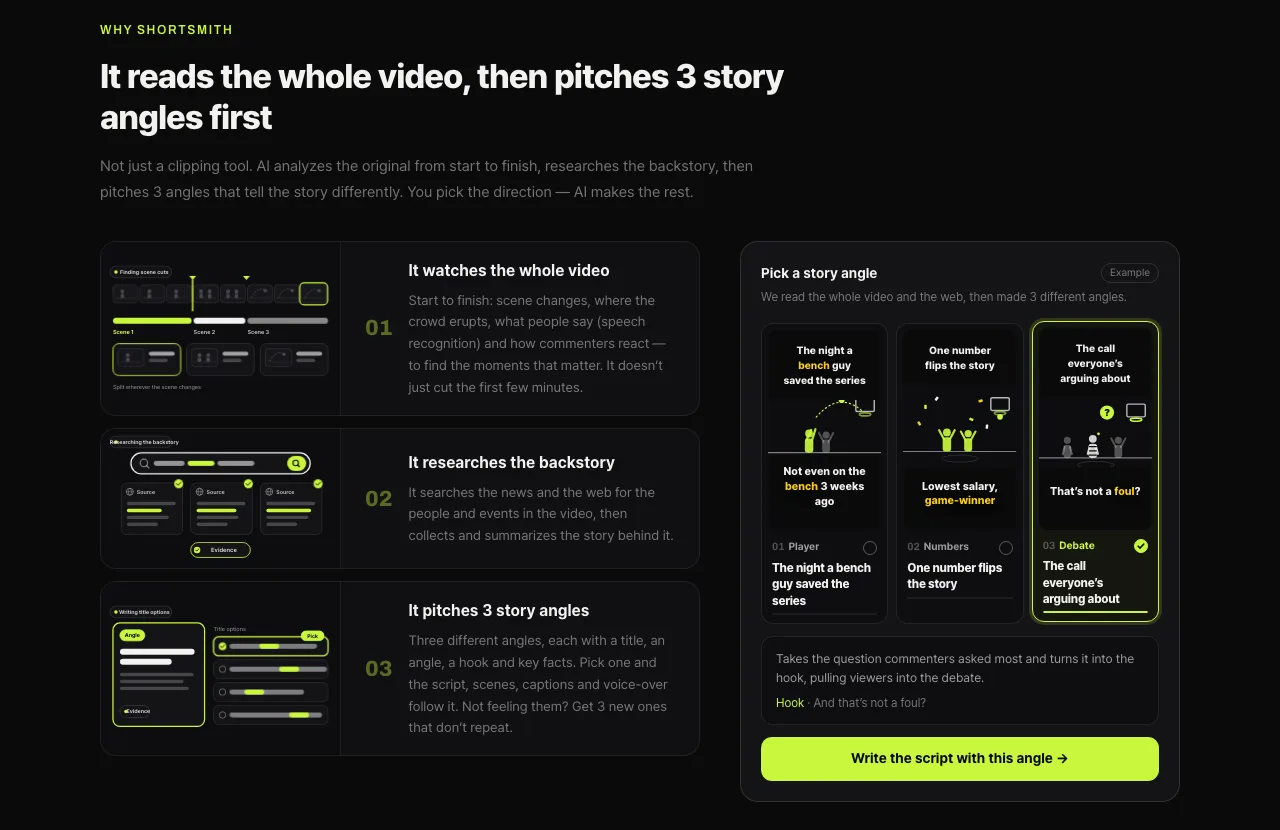
How a Short gets made in Shortsmith
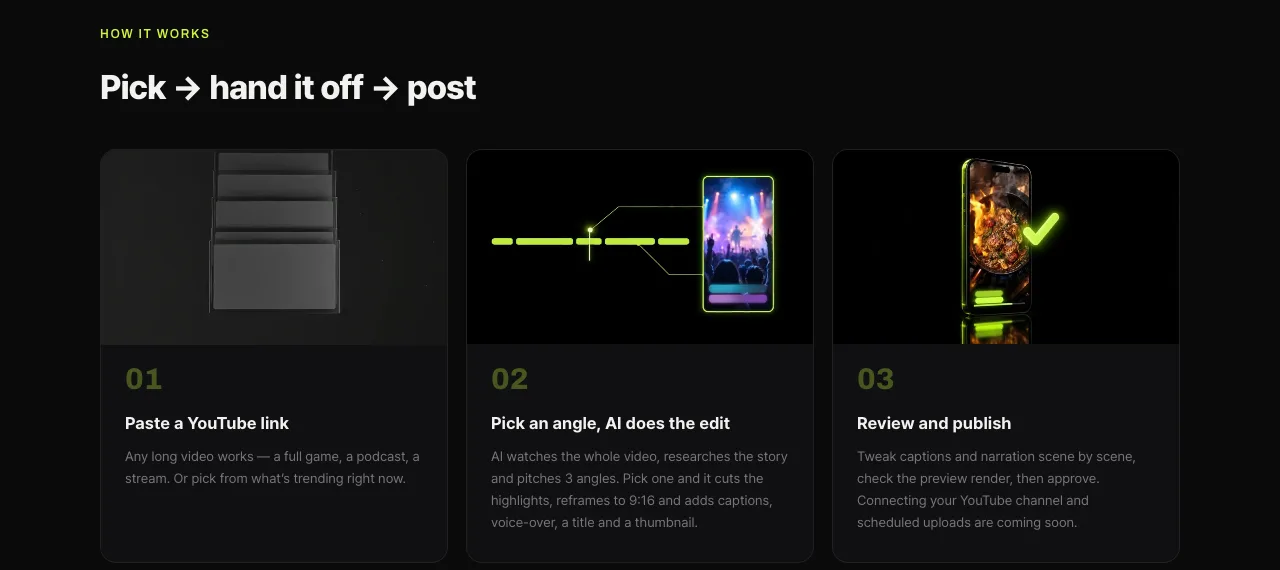
- Paste a YouTube link, or pick a video from the trending charts (United States and Korea).
- Choose one of the three story angles AI suggests. Not feeling them? Ask for new ones.
- Review and edit the script, captions and voice-over scene by scene.
- Check the preview, render, and download the finished 9:16 video for Shorts, Reels and TikTok.
FAQ
Can I earn Shorts ad revenue with 500 subscribers?
No. The 500-subscriber tier (3 uploads in 90 days plus 3,000 watch hours or 3M Shorts views) unlocks fan funding such as Super Thanks and channel memberships, and Shopping. Ad revenue requires 1,000 subscribers plus 10M Shorts views in 90 days (or 4,000 watch hours in 12 months).
Does Shorts watch time count toward the 4,000 hours?
No. Time watched in the Shorts Feed is excluded from the 4,000-hour calculation. Shorts-first channels should aim for the 10-million-Shorts-views path.
If I join YPP before February 2027, do I avoid the new rules?
The higher entry bar (8,000 hours or 20M views) only applies to new applicants, so channels already in YPP keep their status. But to earn Shorts ad revenue, existing partners also need 10M Shorts views in the last 90 days each month from February 2027.
Do I get removed from YPP if I drop below 10M views?
No. Only Shorts revenue sharing pauses; long-form revenue continues. Shorts revenue sharing resumes automatically when you’re back above 10M views in 90 days.
Does music in my Shorts reduce my earnings?
It reduces how much of those views’ revenue goes to the Creator Pool: half with one track, one third with two. Your share of the pool and the 45% creator share stay the same whether or not you used music.
Can Shorts made with AI be monetized?
Yes. YouTube allows AI as a creative aid. Templated, repetitive videos with no perspective can be treated as inauthentic content, and realistic synthetic scenes must be disclosed under AI use when you upload.
Sources
- YouTube Partner Program overview & eligibility — YouTube Help · checked
- Overview of the expanded YouTube Partner Program — YouTube Help · checked
- New opportunities to earn and changes to the YouTube Partner Program (August 10, 2026) — YouTube Official Blog · checked
- YouTube Shorts monetization policies — YouTube Help · checked
- YouTube channel monetization policies (reused and inauthentic content) — YouTube Help · checked
- Disclosing use of altered or synthetic content — YouTube Help · checked