Subtitles for Shorts: length, reading speed, position and style (October 2026)
Shortsmith team · Updated
Shorts subtitles are easiest to follow with the sound off when each line stays around 42 characters, there are no more than two lines, and the text runs at under 20 characters per second. Those numbers come from Netflix’s published English timed text style guide. On Shorts, the bottom of the screen is covered by the like and comment buttons and the title text, so placing captions just under the video or toward the middle matters too.
We checked Netflix’s English and Korean timed text style guides and YouTube Help’s “Add subtitles and captions” on October 18, 2026, and explain how to pick a caption style template in Shortsmith.
Subtitle numbers at a glance
| Item | English | Korean (for reference) |
|---|---|---|
| Characters per line | 42 | 16 (Latin letters, spaces and punctuation count as half) |
| Lines | Two max | Two max; one line if it fits |
| Reading speed (adult) | 20 characters per second | 12 characters per second |
| Reading speed (children) | 17 characters per second | 9 characters per second |
| Line breaks | After punctuation, before conjunctions and prepositions | Bottom-heavy pyramid |
Length and reading speed: short, quick pieces
Netflix’s English guide allows 42 characters per line and two lines per subtitle, with a reading speed of up to 20 characters per second for adult programs and 17 for children’s programs. When a subtitle breaks into two lines, break after punctuation and before conjunctions or prepositions, and keep words that belong together (an article and its noun, a first and last name) on the same line.
For Shorts, go even shorter than this. The screen is small and cuts change fast. Break narration captions into the phrases you actually speak, show one phrase at a time, and color only the one key word you want to stress. Cramming a full sentence onto one screen makes viewers miss the next shot while they read.
Position: clear of the buttons and title
On Shorts, the like, dislike, comment and share buttons sit on the right, and the channel name and title text overlap the bottom. Put captions at the very bottom and they collide with that text. If your Short places a horizontal source in the middle of a vertical frame, put captions in the black band just below the video; for a full-screen vertical video, raise them a little above the bottom.
If several people speak, or narration mixes with what people on screen say, use color to tell them apart. Shortsmith shows narration captions and translated captions of the original audio in the same spot, with narration in white and translated speech in yellow. Translated captions are cut short, around 18 characters per line in English.
YouTube auto captions vs. captions you add
YouTube creates automatic captions with speech recognition, but only in the video’s main language. In YouTube Studio’s Subtitles menu you can upload a caption file, paste a transcript and let YouTube set the timing automatically, or type captions while the video plays. Captions added this way open the video to deaf and hard-of-hearing viewers and to people who speak other languages.
These are closed captions that viewers have to switch on, though. Most people scroll Shorts with the sound off or low, so put the key lines in captions burned into the video. Using both works well: burned-in captions carry only the short key lines, while closed captions hold the full dialogue.
Editing the words: don’t transcribe everything
Transcribe speech word for word and subtitles run long, with fillers like “uh, so, like” left in. Drop fillers and repetition where the meaning survives, and keep the core. Shortening lines that exceed the reading speed is basic practice in Netflix’s guides. Leave quotes alone, though, when the exact words are the point of the scene.
When translating speech from another language, pick natural English over a literal translation; an idiom translated word for word often means something else. Keep the spelling of people’s and team names consistent, and explain them briefly only the first time. Numerals such as “3 years later” read faster than spelled-out numbers.
If captions and the on-screen title repeat the same words, viewers skip one of them. In a narrated Short, let captions carry what is said and let the title hold one question about the whole video. More text isn’t better; captions read best when there is one thing to read on screen.
Five subtitle checks before you post
Watch the finished video once on a phone with the sound off. Captions that read fine in the editor are easy to miss on a small screen. If the story still makes sense without sound, your captions are doing their job.
If a scene doesn’t make sense, tightening the previous scene’s caption usually works better than adding more text to that scene. Go through these five checks in order.
- Only one phrase on screen at a time
- No caption faster than 20 characters per second
- Nothing hidden behind the buttons or title text
- The highlight color is on one word only
- Names are spelled the same throughout
Shortsmith caption style templates
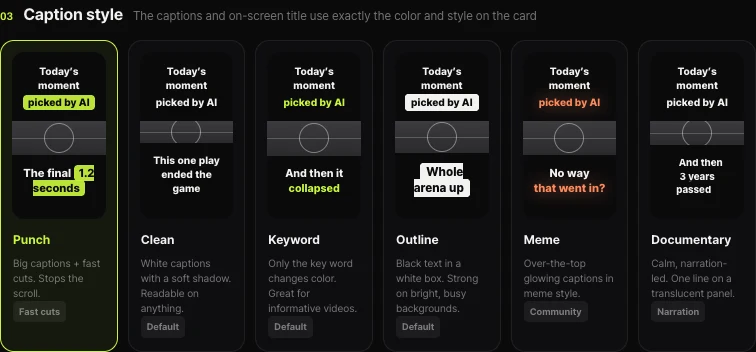
Shortsmith’s caption style templates put the captions and on-screen title into your video in exactly the color and style shown on the card. Punch uses big captions and fast cuts to stop the scroll. Clean is white captions with a soft shadow, readable on anything. Keyword changes the color of the key word only, good for informative videos. Outline is black text in a white box, strong on bright, busy backgrounds. Meme is over-the-top glowing captions in meme style, and Documentary is calm, narration-led, one line on a translucent panel.
You can preview a different keyword color, and the video is made with the template’s default color. In the editor you can also fix captions line by line or move and resize them.
FAQ
How many characters per line for Shorts subtitles?
Netflix’s English guide allows 42 characters per line and two lines. Shorts screens are small, so go shorter and break at spoken phrases.
My subtitles go by too fast. Is there a standard?
Netflix’s English guide caps adult programs at 20 characters per second and children’s programs at 17. If you’re faster than that, shorten the line or split it.
Isn’t YouTube’s auto caption enough?
Auto captions only show when viewers switch them on and only in the main language. Many people watch Shorts muted, so burn the key lines into the video.
Where should subtitles go on a Short?
The bottom is covered by the title text and buttons. Just under the video for horizontal sources, or a little above the bottom for full-screen vertical video.
Should subtitles end with a period?
Netflix’s English guide keeps normal punctuation; its Korean guide drops end-of-line periods and commas. For Shorts, short phrases without trailing periods read cleanly.
How do I add translated subtitles to a foreign-language video?
YouTube Studio lets you upload a caption file per language. Burning translated captions into the video needs an editor; Shortsmith adds yellow translated captions of what people say automatically when the source is in another language.
Sources
- English (USA) Timed Text Style Guide — Netflix Partner Help Center · checked
- Add subtitles and captions — YouTube Help · checked
- Korean Timed Text Style Guide — Netflix Partner Help Center · checked