Taking Shorts global: auto-dubbing, multi-language audio, or making them in English (October 2026)
Shortsmith team · Updated
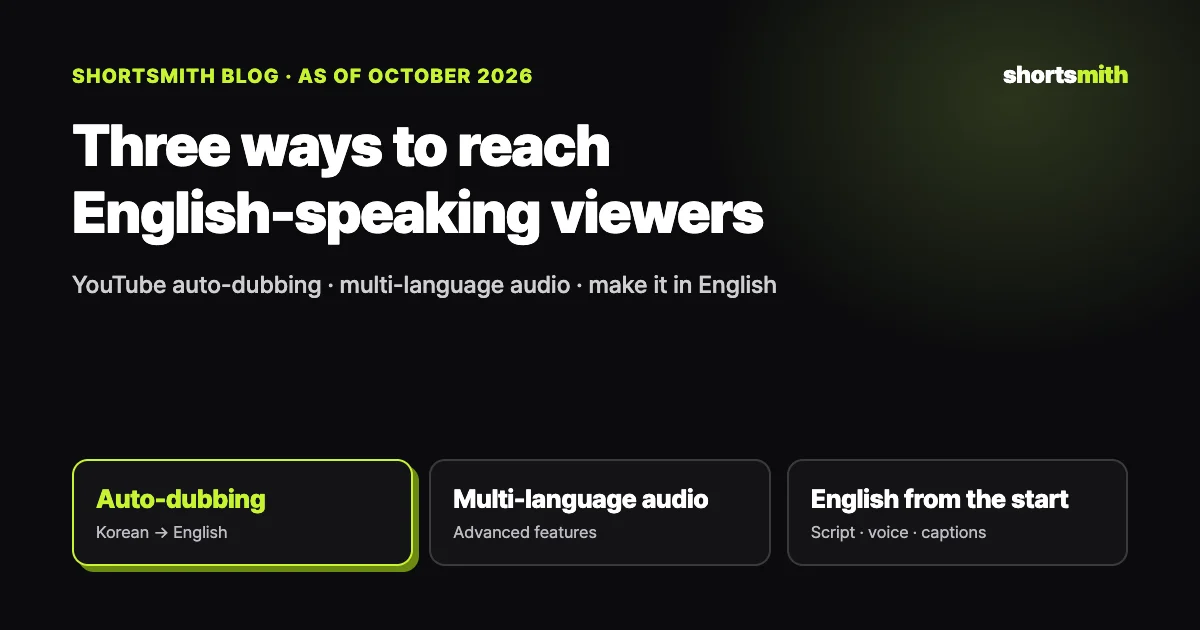
There are three ways to show your Shorts to viewers in another language: YouTube’s auto-dubbing, which replaces the speech with another language; multi-language audio tracks, where you attach your own dubbed audio to the same video; and making the Short in the target language from the start, with the script, voice, captions and title all in that language. Korean videos auto-dub only into English and Indonesian, and multi-language audio works on Shorts but only for channels with access to advanced features.
We checked YouTube Help Center pages on auto-dubbing and multi-language audio on October 15, 2026 to lay out the requirements and limits, and we explain how to make English Shorts with Shortsmith.
Side-by-side comparison
| Method | Who can use it | Upside | Limits |
|---|---|---|---|
| YouTube auto-dubbing | Eligible channels (on by default when eligible) | Dubs appear with no extra work | Korean sources only to English and Indonesian, dubs can’t be edited, on-screen text stays as is |
| Multi-language audio tracks | Channels with advanced features | Works on Shorts, your choice of voice | You produce and upload audio that matches the video length |
| Make it in English from the start | Anyone | Script, voice, captions and title all in English; findable in English search | Korean viewers need a separate version |
1. YouTube auto-dubbing — on by default for eligible channels
Auto-dubbing is turned on by default for eligible creators, and if it’s off you can enable it in YouTube Studio’s advanced settings. Each source language supports different dub languages: Korean videos are dubbed only into English and Indonesian, while English videos can be dubbed into about 20 languages, including Korean and Japanese. Dubbed videos show an “auto-dubbed” note in the description, and viewers can switch between the original and dubbed audio.
The limits are clear. Videos longer than 120 minutes, videos with little or no speech or only music, very fast speech, and videos with a copyright claim may not be dubbed. Because dubs are generated automatically, names, idioms and technical terms can come out wrong, and you can’t edit them. The only fix for a bad translation is correcting the video’s original language so the dub is regenerated. The help page doesn’t say whether auto-dubbing applies to Shorts.
On-screen text doesn’t get dubbed
Auto-dubbing changes only the audio. Korean captions, titles and highlighted words burned into a Short stay as they are, so viewers listening in English can’t read them. The more text a commentary Short carries, the bigger the gap.
2. Multi-language audio tracks — attach audio you made
Multi-language audio lets you attach audio in another language, recorded yourself or by a vendor, to the same video. It works on both long videos and Shorts, but right now only creators with access to advanced features can use it. In YouTube Studio, open Languages, pick the video, add a language, then upload the audio file under Dub. The file must be audio-only and roughly the same length as the video.
YouTube says creators who upload multi-language audio see more than 25% of their watch time in languages other than the video’s primary language. Adding translated titles and descriptions can also surface the video in searches in that language. The feature doesn’t create the voice for you, though, so you need to produce the English audio separately, and an existing auto-dub in that language must be deleted first.
3. Make it in English from the start — the cleanest option for Shorts
Shorts are a text-heavy format. When the opening title, commentary captions, highlighted words and comment overlay are all burned in Korean, switching only the audio to English leaves international viewers with half a video. Writing the script in English, reading it with an English voice, and making the captions, title, hashtags and description English means everything the viewer sees and hears is in one language. English titles and descriptions also make the Short findable in English search right away.
Post English Shorts to an English channel, or to a channel where mixed languages are fine. Mixing Korean and English videos on one channel can blur who the recommendation system shows them to. If you make both a Korean and an English version from the same source, post each to the channel in its language.
Making English Shorts with Shortsmith
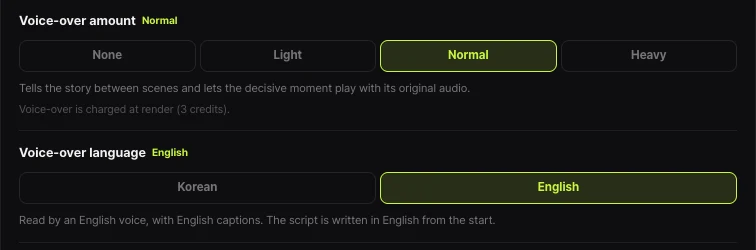
In Shortsmith’s Create page, set “Voice-over language” to English under the production options. The script is then written in English from the start, read by an English voice, and captioned in English. Because it isn’t a Korean script translated afterwards, there’s no translation charge and the English reads naturally. English has the same 14 voices as Korean: 8 ElevenLabs voices and 6 Lite voices.
If the source is in another language, original-audio scenes get translated captions; when the source and script share a language, the original speech plays without captions. Members who sign up on the English site (/en) start with English voice-over selected. If you also need a Korean version of the same video, create another project and choose Korean.
Which one should you pick?
To bring Korean videos you’ve already posted to an international audience, leaving auto-dubbing on takes the least effort. It works best on speech-driven long videos with little on-screen text. If you want quality control with your own or a voice actor’s voice and your channel has advanced features, multi-language audio tracks are a good fit.
For new Shorts, we recommend making them in English from the start. Shorts live or die on the on-screen text and the first three seconds, and both need to be English for English-speaking viewers to stay. Making Korean and English versions from the same source and posting each to its own channel lets you test two markets with one idea.
FAQ
Which languages can a Korean video be auto-dubbed into?
According to YouTube Help, Korean sources are dubbed into English and Indonesian. Supported languages are expanding, so check the Languages page in YouTube Studio.
Can I edit an auto-dub?
No. If the translation is wrong, correct the video’s original language so the dub is regenerated. Previewing, publishing and deleting dubs happen in YouTube Studio on a computer.
Can Shorts have multi-language audio?
Yes. Multi-language audio tracks can be uploaded to both long videos and Shorts, but only channels with advanced features can use them.
Does making it in English cost more on Shortsmith?
No. Only the voice-over language changes and the credits stay the same. Because the script is written in English from the start, there is no translation charge.
Can I post Korean and English Shorts on one channel?
You can, but mixing audiences can blur recommendations. We recommend posting English versions to a separate English channel.
Sources
- Use automatic dubbing — YouTube Help · checked
- Add multi-language audio tracks to your videos — YouTube Help · checked