Writing a Shorts script: the first line and the last line (October 2026)
Shortsmith team · Updated
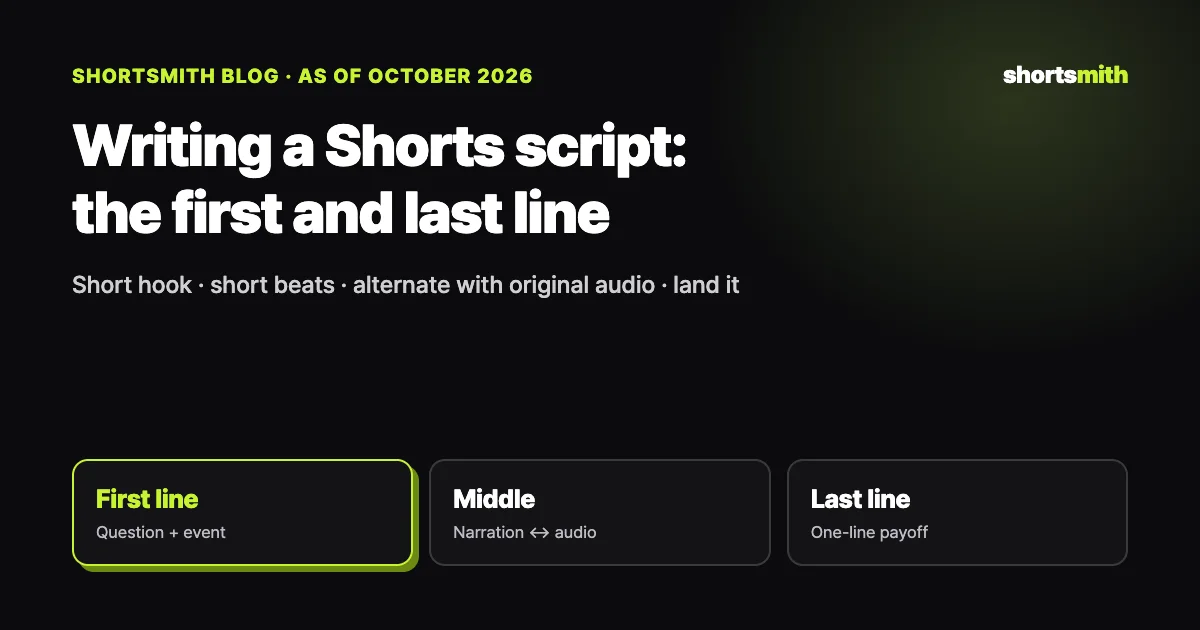
Think of a Shorts script in three parts. The first line delivers what happened and why it’s intriguing within about two seconds; the middle alternates short narration lines with the original voices of the people on screen; and the last line closes with the result or what it means. Viewers decide to watch or swipe in the first one to three seconds, so the first line deserves the most effort.
This guide draws on the rules Shortsmith uses to write scripts (as of October 2026) along with YouTube Help’s “Tips for content tab analytics” and “Learn about Ask Studio in YouTube Studio” (checked October 19, 2026).
A 50-second Shorts script structure
| Part | Job | Guideline (Shortsmith) |
|---|---|---|
| First line (hook) | Event + question; hide the ending | One short line, done in about 2 seconds |
| Middle | Narration line ↔ original audio | Short narration beats; original audio 40–60% |
| Before the climax | A brief cue like “Here it comes” | A few words |
| Last line | The result or meaning in one line | One short line |
| Whole | One story that answers the hook | 50–58 seconds |
First line: the event and a question
YouTube Studio’s content tab shows how many people chose to view a Short versus swipe away, and when that share is low, the problem is almost always in the first one to three seconds. Put the core event in the first line but hide the ending and leave a question. “The game flipped in the final 1.2 seconds” tells too much; “With 1.2 seconds left, the ball went to a rookie” makes people watch the next shot.
A long first line won’t finish in two seconds. Shortsmith keeps the hook to one short line and checks that it contains the event from the chosen angle. Drop greetings like “Hey everyone” or “Today we’ll look at” from the first line.
Middle: one narration line, one original-audio line
The common mistake in the middle is a “recap play-by-play” that retells what happened in each scene in order. If you could delete a narration line and lose nothing by hearing the original audio, that line isn’t needed. Use narration for what the screen can’t show — reasons, meaning, comparisons, results — and let the actual moments and words play in the original audio.
Keep narration beats short and alternate them with original audio, and the voice sounds less robotic while viewers watch the scene for themselves. Avoid repeating what someone on screen said or reading on-screen text aloud. Right before the climax, a few-word cue like “Here it comes” gathers attention.
Last line: one-line payoff, not a vague question
The last line answers the question the hook raised or states what the moment meant. Show the result, like “That rookie won Rookie of the Year that season,” and viewers feel watching to the end paid off. Ending with a vague question like “What do you think?” makes the video feel unfinished and doesn’t do much for comments.
If you want the same subscribe or like request every time, set it as a separate closing line rather than writing it into each script. Inside the script it blurs the story’s ending.
Checking the script when it’s done
When the script is done, read it aloud once. A sentence that leaves you out of breath is too long to hear as narration. Time it to confirm it fits in 50–58 seconds and that the first line ends within about two seconds; that catches most length problems.
Next, read only the narration lines in a row. If they tell the story as one thread, the script works. If they’re a list of “and then this happened,” it has become play-by-play, so check that each line is evidence that answers the hook’s question.
Check the tone too. Lines that flow like you’re telling a friend sound natural, while stacking hearsay phrasing like “apparently” or “they say” makes the content sound flimsy; save it for quoting what someone said. Finally, run through these five checks.
- Does the first line have the event and a question?
- Did you avoid giving away the ending in the first line?
- Does narration avoid repeating the screen or what people said?
- Is close to half the video original audio?
- Does the last line close with the result or meaning?
Five patterns for the first line
A few patterns make first lines easier to write. Using the same one every time makes a channel monotonous, so rotate these five to fit the material.
Whatever the pattern, the first line must contain the video’s real event. Open with sensational lines unrelated to the video and fewer people may swipe, but retention drops and viewers stop trusting you.
After choosing a pattern, write the line three different ways and keep the shortest, most specific one. Swapping a single word for a number or a name makes a line much sharper.
- Number — “With 1.2 seconds left, the ball went to a rookie”
- Twist — “It was the moment everyone thought it was over”
- Question — “Why didn’t he take the shot?”
- Person — “The player who started on the bench ended the game”
- Comparison — “Zero points last year, the game-winner this year”
Shortsmith’s opening and closing lines
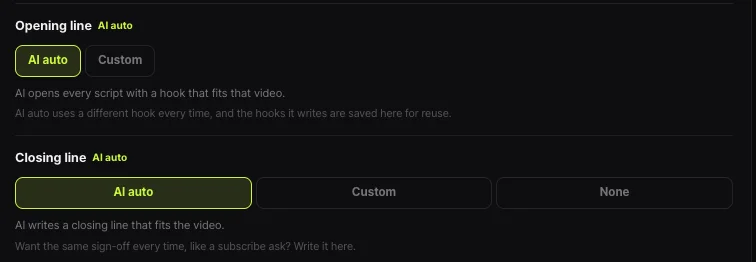
In Shortsmith’s options you can set the opening and closing lines. Opening line “AI auto” starts every script with a different hook that fits that video, and the hooks it writes are saved for reuse; you can also write your own. Closing line offers AI auto, Custom or None.
Once the script is written, fix it line by line in the editor or ask for changes in plain words. You can also paste a script into YouTube Studio’s Ask Studio for feedback, which helps when you’re stuck on the first line.
FAQ
How long should a Shorts hook be?
Short enough to finish in about two seconds. Shortsmith keeps it to one short line with the event and a question.
Can the first line give away the ending?
We don’t recommend it. Say what happened but hide how it ended so people watch to the end.
How much narration should I use?
In a 50–58 second video, keep original audio at 40–60% and break narration into short lines that alternate with it.
Can I end with “What do you think?”
Vague questions make the video feel unfinished. Close with the result or meaning in one line.
Where does a subscribe request go?
If it’s the same every time, set it as a separate closing line. Shortsmith lets you write a custom closing line.
Where can I get script feedback?
Paste your script into Ask Studio in YouTube Studio. It works in computer browsers for creators 18 and over.
What tone should the script use?
Write like you’re telling a friend. Save hearsay phrasing like “apparently” for quoting what someone said.
Sources
- Tips for content tab analytics — YouTube Help · checked
- Learn about Ask Studio in YouTube Studio — YouTube Help · checked