Making Shorts from a podcast: picking sections to translated captions (October 2026)
Shortsmith team · Updated
The key to making Shorts from a podcast is choosing 30 to 60 seconds that make sense without the rest of the conversation: one question and its answer, or the moment a guest’s voice rises. Keep the guests’ own voices front and center, add only the context a first-time viewer needs in a short narration line or on-screen title, and one hour-long episode can yield several different Shorts.
We checked YouTube Help’s “Video clips & Shorts” and “Deliver podcasts using an RSS feed” on October 19, 2026, and explain how to choose the part of a long podcast to use in Shortsmith.
Good podcast sections, at a glance
| Section type | Why it works | Watch out for |
|---|---|---|
| Question → answer | Viewers start asking the same question | Don’t cut off the start of the question |
| A moment of disagreement | Draws comments | Add the background in one line |
| A burst of laughter | Easy to share | Cut before the laughter fades |
| Numbers and personal stories | Concrete, so it feels credible | Leave out ad and sponsor reads |
Pick sections: one question, one answer
Podcast conversations run long, so cutting anywhere loses what led up to a line. Start the section at the host’s question or the first sentence of a new topic, and end it right after the key sentence of the answer. Starting on the tail of a previous sentence makes viewers swipe in the first second.
If you make several Shorts from one episode, pick a different question for each. Splitting one story into a first and second half makes the second feel like a repeat. Leave mid-episode ad or sponsor reads out of your Shorts; they become unrelated scenes, and sponsor disclosure obligations come along with them.
Keep the guests’ voices; keep narration short
The strength of a podcast Short is the guest’s real voice and delivery. If narration summarizes what the guest says, viewers have no reason to listen to the original audio. Use narration only for what a first-time viewer needs, like who this person is or what question they’re answering, and let the key answer play in the guest’s own voice.
Shortsmith’s “Normal” voice-over for general videos writes scripts that alternate a short narration line with the original audio. If narration simply repeats what the guest said, a check catches it and the line is rewritten, and the original audio is kept at 40% or more of the video. You can also choose Cut edit to use only the original audio with no narration.
For long episodes, start with “Part to use”
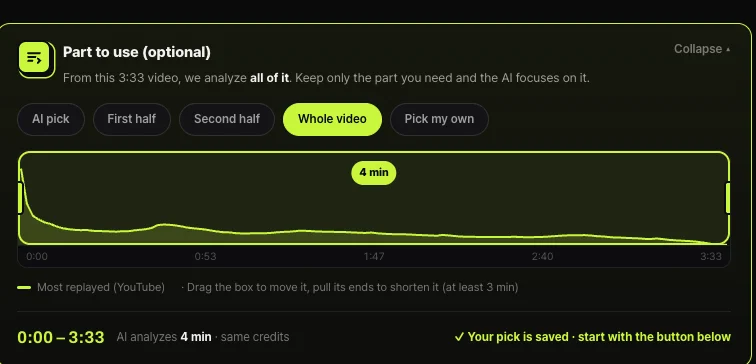
Analyzing a podcast over an hour long in full takes time and scatters the scenes AI picks. For any video over a minute, Shortsmith shows a “Part to use” box where you choose first half, second half, whole video or pick your own. Sources over 60 minutes are accepted up to three hours long, and only the 60 minutes you choose are analyzed.
The box shows YouTube’s “Most replayed” graph so you can see where viewers rewound before deciding. Drag the box to move it or pull its ends to shorten it; your pick is saved right away, and shortening it doesn’t change the credits.
Framing a podcast Short
Most podcast video is a static shot of two or three people at microphones. Since the picture barely changes, words and captions hold viewers. Show what guests say one phrase at a time in large captions, and put a title at the top that says what the conversation is about.
Switching the frame to whoever is speaking reduces monotony. For multi-camera podcasts, cut to the speaker’s camera; with a single camera, center the source with a title above and captions below. Break long answers into cuts every three or four seconds to create rhythm.
At the end, leave a path to the full episode. Put the episode name and number on the first line of the description, and for your own podcast link the source video as the related video so Shorts viewers can move on to the full episode.
Watch-outs for translated captions
When putting a foreign-language podcast into translated captions, keep each line short. If a fast-talking stretch is crammed into one translated sentence, it’s gone before anyone can read it. Shortsmith breaks translated captions into short lines that keep pace with the speech.
Names and numbers are where translations go wrong most. Check guests’ names, company and team names, and amounts before rendering, and fix the line in the editor if needed.
Also keep translated captions and narration from repeating each other. The guest’s words are read in captions, so use narration to add the background or meaning briefly.
Foreign-language podcasts and playlists
To make English Shorts from a podcast in another language, show what guests say as translated captions and add context with English narration. Turn on Translated captions in Shortsmith and original-audio scenes get yellow English captions when the source is in another language. If the source language matches the voice-over language, no translated captions appear.
If you’re clipping your own podcast, tidy your playlists too. YouTube recommends keeping podcast playlists to full episodes and managing Shorts outside them. YouTube also says podcast content delivered by RSS can’t contain advertisements and that branded content or sponsorships must be disclosed. If you use someone else’s podcast, make your contribution clear with commentary or analysis and follow the reused content policy.
FAQ
How long should a podcast Short be?
30 to 60 seconds with one question and one answer. With narration, keep it to 50–58 seconds and leave close to half for the original audio.
Can I just cut the original audio with no narration?
For your own podcast, yes; choose Cut edit in Shortsmith. For someone else’s podcast, your contribution needs to be clear.
Does it work for episodes over an hour?
Shortsmith accepts sources over 60 minutes up to three hours and analyzes the 60 minutes you choose in “Part to use.”
Can I make English Shorts from a Korean podcast?
Yes. Translated captions show the guests’ words in English while English narration adds the context.
Should Shorts go in my podcast playlist?
YouTube recommends podcast playlists contain only full episodes. Manage Shorts outside them.
What about ad reads?
Leave them out. They become unrelated scenes, and sponsored segments carry disclosure obligations.
Isn’t podcast video boring to watch?
Switch the frame to whoever’s speaking and show their words one phrase at a time in large captions, and even a static shot feels less flat.
Sources
- Video clips & Shorts — YouTube Help · checked
- Deliver podcasts using an RSS feed — YouTube Help · checked