Auto-generating YouTube Shorts: what to hand to AI and what to decide yourself (October 2026)
Shortsmith team · Updated
Auto-generating YouTube Shorts means you give a video link or file, and AI fetches and analyzes the video, suggests story angles, adds a script, voice-over, captions and a title, and renders a vertical video. Your job is to pick the angle, check the script’s facts and tone, and choose where and when to post. Skip those three and the result can look like mass-produced content, which can lose monetization.
This post is based on timings Shortsmith measured on October 14, 2026 with a 60-minute source and a 59-second final video, and on YouTube Help pages checked October 13–15, 2026 (three-minute Shorts, monetization policies and AI disclosure).
What AI does and what you decide
| Step | What AI does | What you decide |
|---|---|---|
| 1. Add a source | Fetch the video from a link or check the file | Which video to use (your own or licensed footage first) |
| 2. Analysis | Transcription, scene detection, scene reading, most-replayed parts | For long videos, the part to use |
| 3. Story angles | Several different angles with title options | Pick one or several |
| 4. Script | Narration ↔ original audio, hook, ending, fact checks | Check facts, names and tone; edit if needed |
| 5. Render | Voice, captions, on-screen title, cuts, vertical 9:16 | Voice and caption template |
| 6. Post | Fill in title, description and hashtags | Where, when, and whether an AI label is needed |
Step 1 — a link, a file, or Trending
Half the quality of an auto-generated Short is decided by the source. Videos full of talk and reactions (shows, interviews, podcasts, gaming streams, sports) work well with alternating narration and original audio; music-only videos are hard to build a story from. If you use someone else’s footage, start with your own uploads, videos you have permission to use, or reuse-friendly licenses such as CC BY.
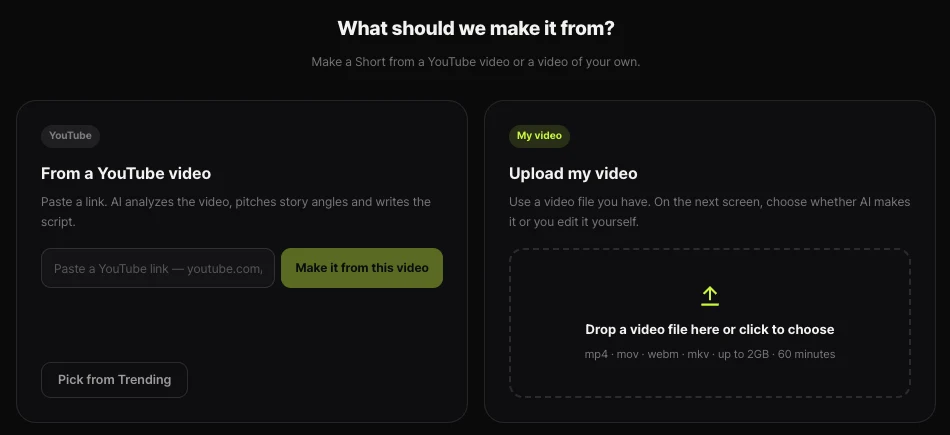
On Shortsmith’s Create page you can paste a YouTube link, upload your own file (mp4, mov, webm or mkv, up to 2 GB and 60 minutes), or choose today’s trending videos with “Pick from Trending.” For videos longer than a minute, “Part to use” lets you focus the analysis on one section.
Steps 2–4 — analysis, angles, script
The AI transcribes the speech, finds where scenes change and reads representative frames to understand what happens. For YouTube sources it also looks at the most-replayed parts and top comments, then shows several story-angle cards that each take a different direction. Pick more than one and each angle becomes its own video.
The script is written for the angle you picked. Shortsmith alternates short narration lines with the original audio, so the voice-over only lays the bridges while laughs, reactions and key lines come from the people on screen. Numbers, names and quotes that aren’t in the source get rewritten against the evidence, and anything still uncertain is flagged “Needs checking” in the editor. Those flags are what a person should read first.
How long does it actually take?
Measured on Shortsmith’s server on October 14, 2026: a 60-minute 1080p gaming stream (4.3 GB) took about four minutes to fetch and tens of minutes to transcribe and analyze. After choosing an angle, the script took 1 min 12 s to 1 min 19 s, and rendering the 59-second Short took about six minutes including 23 seconds of voice-over. Analysis time scales with source length, so a 10-minute video finishes much sooner, and narrowing the part speeds it up too.
The progress screen shows what the AI is doing, how much of the source has arrived and the time left. You can close the window; the server keeps going and the bell (plus text or email, if you set them up) tells you when angles are ready or the render is done.
What to look for in an auto-generation tool
There are plenty of Shorts generators, but quality comes down to a few things. First, does it keep the original talk and reactions? Covering everything with narration removes the people on screen, makes the Short less fun and makes it look more like reused content. Second, can you edit the script, and does it check facts? Third, does it suggest several angles so one source can become different stories?
Fourth, can you see the cost and time per video up front? Fifth, can you post or schedule straight to YouTube Shorts and Instagram Reels? If you’re aiming at international viewers, check whether the script, voice and captions can be made in English from the start.
The traps — inauthentic content and AI labels
YouTube blocks monetization for videos that look template-made or interchangeable, and for AI content that seems mass-produced without the creator’s own perspective (the policy was renamed “inauthentic content” on July 15, 2025). Stitching other people’s videos together without meaningful commentary or editing counts as reused content and can switch off monetization for the whole channel. That’s why, even with an auto-generation tool, every video needs its own source, story and commentary.
Check the AI label too. YouTube only asks you to disclose realistic altered or synthetic content, such as making a real person appear to say or do something they didn’t; scripts, titles and thumbnails written with AI, captions and audio cleanup don’t need disclosure. A typical Short that puts AI narration over real footage usually doesn’t need the label, but if you generated realistic AI scenes, turn on “Altered content” when uploading. Vertical or square videos up to three minutes count as Shorts.
Three things a person should always do
1) Pick the angle — a story that fits the channel and doesn’t repeat earlier videos. 2) Check the script — names, numbers and quotes against the source, starting with the “Needs checking” flags. 3) Pre-post check — does the title match the opening shot, is an AI label needed, is the source credited?
FAQ
Can I post YouTube Shorts fully automatically?
You can go from creation to upload and scheduling in one flow, but we recommend a person picks the angle and checks the script. Posting unchecked videos in bulk can look like inauthentic content and lose monetization.
Can AI-made Shorts be monetized?
Yes, as long as each video has its own story and meaningful commentary or editing. Repeating one template or stitching others’ videos together can lose monetization.
How long does one Short take?
It depends on the source. Our 60-minute test took about four minutes to fetch, tens of minutes to analyze, just over a minute for the script and about six minutes to render 59 seconds; short sources finish much faster.
Do I need an AI label for AI voice-over?
Under YouTube’s rules, AI-written scripts and audio cleanup don’t need disclosure. If you made a real person’s voice say something they didn’t, you do.
What kinds of videos work best?
Videos with lots of talk and reactions: shows, interviews, podcasts, gaming streams and sports. Music-only or nearly silent videos are hard to turn into a story.
Sources
- YouTube channel monetization policies (reused and repetitive content) — YouTube Help · checked
- Disclosing use of altered or synthetic content — YouTube Help · checked
- Understand three-minute YouTube Shorts — YouTube Help · checked