How to make an AI dance challenge video from one photo (October 2026)
Shortsmith team · Updated
The Reels, Shorts and TikToks where the same dance is performed by a different person each time are mostly made with an AI technique called motion transfer. It reads only the body movement and camera movement from the clip you want to copy, then redraws the person and the scene from the photo you upload. You don’t have to learn the dance or film anything — one photo is enough to perform the same choreography.
This guide uses Shortsmith’s Viral motion as the example and covers how to pick the source clip and your photo, what it costs by length and quality, and what tends to go wrong. The AI labeling rules for TikTok and YouTube were checked against each help center on October 13, 2026.
How does motion transfer work?
A motion transfer model takes two inputs: the video to copy and a photo of the person who will star in it. It reads the joints, body direction and camera movement of the person in the video frame by frame, then redraws the face, build and outfit from your photo to match that movement. It is not a cut-and-paste composite of the original dancer — it borrows the motion and generates a whole new frame.
Shortsmith Viral motion runs on Higgsfield’s motion transfer model. You can add 1 to 8 photos; the more you add, the closer the face and outfit stay to your pictures. Besides Realistic, you can pick six restyle looks that change the art style: Anime, 3D toy, Knitted yarn, Felt puppet, Gouache and Pixel art.
Step by step in Shortsmith
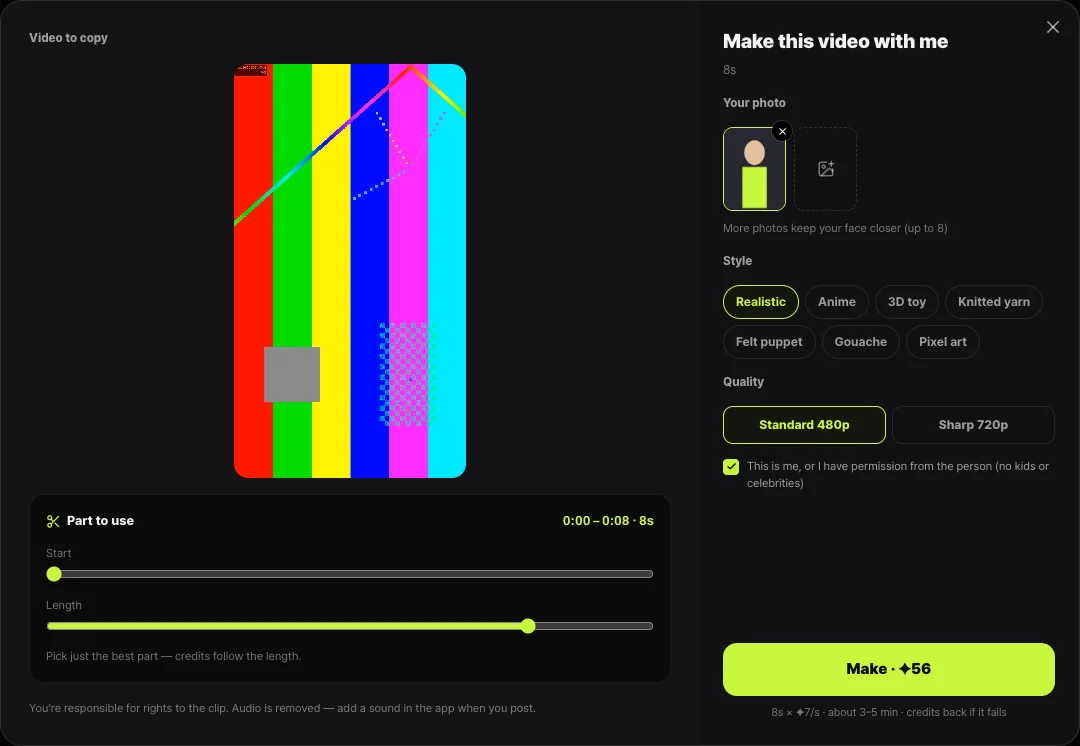
- Open Viral motion in the left menu and paste the link of the video you want to copy (Instagram, YouTube or TikTok), or use Upload file.
- The server fetches the video and shows a silent preview, usually within 10–30 seconds. Sources up to 3 minutes long are supported.
- Under Part to use, set the start point and a length of 4–15 seconds. Pick only the best part — credits follow the length.
- Add your photo, choose a style and quality (Standard 480p or Sharp 720p), and tick the box confirming the photo is you or you have permission.
- Press Make. In about 3–5 minutes the finished clip appears under My viral motions and you get a notification. Download it and add a sound in each app when you post.
Picking a source clip that works
Results depend heavily on how clearly the model can read the body in the source. The best clips show one person from head to toe, with clothes that stand out from the background. When the body keeps leaving the frame or several people overlap, the model can misread limbs — hands vanish or bodies twist.
The camera matters too. A locked-off shot or a slow follow carries over well, while shaky footage or edits that cut every second tend to look choppy. If the source has many cuts, pick a 4–10 second stretch where one shot runs continuously.
- One person, full body, close to facing the camera
- A fixed camera or slow camera movement
- A bright frame where the outfit stands out from the background
- Avoid long stretches where hands cover the face or the body spins fast

Which photo should you upload?
The best photos show you alone, facing the camera, with your full body in frame. A waist-up photo forces the model to imagine your legs and shoes, which makes results inconsistent. Sunglasses and masks also reduce the likeness.
Several photos help the model lock in face angles and outfit details. Two or three front and side shots taken the same day in the same outfit work well. Shortsmith strips camera metadata such as location from your photos and re-saves them before generating.
Only your own photos
To use someone else’s photo you need their permission, and photos of children or celebrities should not be used at all. TikTok does not allow AI-generated content showing the likeness of anyone under 18, or of adult private individuals without their permission.
Cost and time
Viral motion is priced by the length of the part you use: 7 credits per second at Standard 480p and 14 credits per second at Sharp 720p. The style does not change the price. A clip usually takes 3–5 minutes, and if the provider fails, the credits are refunded automatically.
| Length | Standard 480p | Sharp 720p |
|---|---|---|
| 4 s | 28 credits | 56 credits |
| 8 s | 56 credits | 112 credits |
| 15 s | 105 credits | 210 credits |
What about the music and the source video?
Viral motion makes the video without sound, because re-uploading the song from the original is an easy way to run into music rights problems. When you post to TikTok, Reels or Shorts, add the same song or a similar track from the app’s own sound library — those sounds are licensed and managed by the platform.
The clip you borrow movement from is someone’s work, too. Your own footage, free stock video licensed for commercial use, or a clip you have permission for are the safe choices. If you use another creator’s video, credit them in the caption, and if the choreography belongs to an artist’s challenge, include the challenge hashtag so viewers can find the original.
Do you need an AI label when you post?
Turn the label on for Realistic Viral motion clips. TikTok’s help center lists a video where the primary subject is portrayed doing something they didn’t do — for example, dancing — as content significantly edited by AI, and requires a label on realistic AI-generated content. Turn on the AI-generated content setting under More options when posting; TikTok says doing so won’t affect distribution.
YouTube likewise asks you to choose Yes for AI use when a realistic video makes a real person appear to do something they didn’t. Clearly unrealistic looks such as Anime or Pixel art fall outside YouTube’s disclosure rule, but TikTok still encourages labels when the subject is no longer recognizable, so turning it on is the safer habit.
FAQ
Is one photo enough?
Yes, one photo works. For a closer likeness, add two or three front and side shots in the same outfit (up to 8).
My Instagram link won’t load.
Instagram sometimes blocks outside downloads. Save the video to your phone and use Upload file instead — everything else works the same.
Can I use a group dance video?
One person in full view works best. Overlapping dancers can confuse the movement tracking, so pick a stretch where one person is clearly in the center.
Does the finished clip include the original song?
No. It is made without sound to avoid music rights issues. Add a sound from the TikTok, Reels or Shorts library when you post.
What happens to my credits if it fails?
If generation fails, the credits are refunded automatically and you get a notification.
Sources
- About AI-generated content — TikTok Help Center · checked
- Disclosing use of altered or synthetic content — YouTube Help · checked