How to find CC BY videos for Shorts and credit them properly (October 2026)
Shortsmith team · Updated
If you want to use someone else's footage in a Short, the safest place to start is videos whose creators have already allowed reuse under a Creative Commons Attribution (CC BY) license. YouTube Help says you can find them by selecting Creative Commons in the advanced search filters, and that license information also appears in video descriptions. Other creators can reuse CC BY videos as long as they credit the creator.
We checked YouTube Help's Creative Commons page and Creative Commons' "Recommended practices for attribution" on October 12, 2026. This guide covers how to find CC BY videos, the TASL rule for crediting them, what to check before monetizing, and how the example videos on the Shortsmith home page credit their sources.
How to find CC BY videos on YouTube
The license is chosen by the creator at upload. YouTube asks creators to apply it only to content they can license under CC BY, such as their own original content, content already released under CC BY, or public domain content, and says a video with a Content ID claim cannot be marked with the CC BY license.
- Search YouTube for your topic, for example street performance or travel vlog.
- Open Filters above the results and select Creative Commons under Features.
- Expand the description of a video you like and check the license line (for example "Creative Commons Attribution license (reuse allowed)").
- Note the video title, channel name, URL and license. You will use them in your credit.
Check this
A CC BY label does not tell you whether music or broadcast footage inside the video was cleared. Prefer videos made of footage the creator filmed themselves.
How to credit: the TASL rule
Creative Commons recommends including the Title, Author, Source and License when you reuse CC-licensed work, which it shortens to TASL. The rule is the same whether you use the work as-is or adapt it, and if the licensor asks to be credited under a particular name or organization, use that.
For a Short, one line in the description is the cleanest approach, for example: "Source: [video title] / [channel] / youtube.com/watch?v=… / CC BY". That covers all four elements. If you mixed several videos, give each one its own line.
| Element | What to write | Example |
|---|---|---|
| Title | The original video title, if there is one | "[Travel vlog title]" |
| Author | The creator or channel name, as they want to be credited | "[Channel name]" |
| Source | The original video URL | youtube.com/watch?v=… |
| License | The license name | CC BY |
Can you monetize Shorts made from CC BY videos?
YouTube Help says you can monetize Creative Commons content if the license grants you the right to use it commercially, and notes that some copyright owners require you to credit the creator or show proof of purchase. CC BY allows commercial use, but leaving out the credit breaks its terms.
Monetization is still reviewed separately from the license. YouTube's reused content policy asks for a meaningful difference, one viewers can recognize, between the original and your video. Reposting a CC BY video unchanged may be fine under the license and still fail monetization review, so add a question, commentary and a story order that make your point of view clear.
- License: CC BY allows commercial use, but credit is required
- Monetization review: the reused content policy's meaningful difference still applies
- TikTok Creator Rewards only pay for content you filmed and produced, so Shorts built on CC BY footage are unlikely to qualify there
How the Shortsmith examples credit their sources
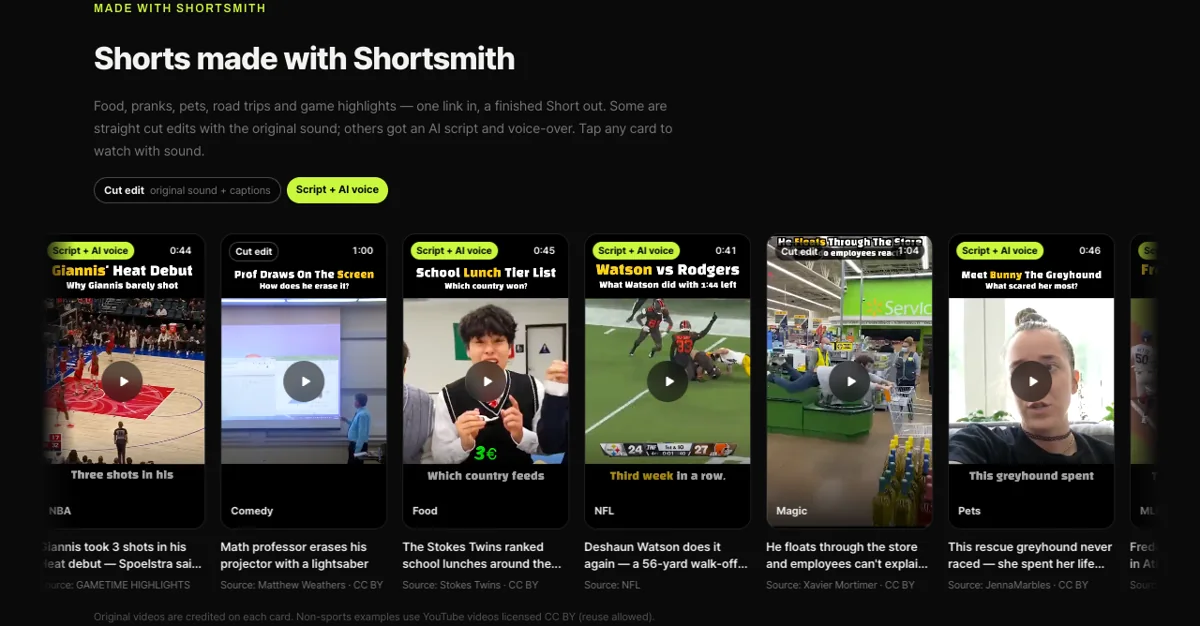
Apart from the game videos, every example in the "Shorts made with Shortsmith" row on our home page was made from YouTube videos licensed for reuse (CC BY). As the image below shows, each card lists "Source: channel name · CC BY" and links to the original, and a note under the row says the source is credited on each card.
We recommend the same approach when you turn CC BY videos into Shorts with Shortsmith. Paste the link and Shortsmith reads the whole video, suggests three story angles, and writes a script and captions with a question, evidence and payoff for the angle you choose, which adds a meaningful difference. Put a one-line TASL credit in the description when you publish, and you cover both the license terms and the monetization review.
How other licenses differ from CC BY
CC BY is the only Creative Commons license you can choose when uploading to YouTube, but videos and images elsewhere may carry other CC licenses. Licenses with NC (NonCommercial) in the name do not allow commercial use, so they do not fit a monetized channel, and licenses with ND (NoDerivatives) do not allow you to edit or cut the work at all. For Shorts material, stick to CC BY or public domain, where both commercial use and editing are allowed.
A video with no license label is not free to use; it means you do not have permission. YouTube Help has separate guidance on getting permission from the rights holder to use someone else's content. If you are unsure about a video, leave it out.
FAQ
Can I use CC BY videos without asking?
Yes. The creator has already allowed reuse by choosing the CC BY license, so you do not need to ask. Crediting the title, author, source and license is the condition of use.
I can't find the Creative Commons filter in YouTube search.
Open Filters at the top of the search results and look under Features. Its position can vary by app version, so try searching in a desktop browser if you do not see it.
Will CC BY videos avoid Content ID claims?
YouTube says a video with a Content ID claim cannot be marked CC BY. Music or broadcast footage inside a video can still cause problems, so prefer footage the creator filmed themselves.
Should the credit go in the video or the description?
Creative Commons lets you choose the form that suits your use. Shorts have little screen space, so a one-line TASL credit in the description is the cleanest option.
What happens if I mark my own Short as CC BY?
Other creators can reuse it as long as they credit you. You can choose the license in the upload settings, but not if the video has a Content ID claim.
Sources
- Creative Commons — YouTube Help · checked
- Recommended practices for attribution — Creative Commons · checked
- YouTube channel monetization policies (reused and inauthentic content) — YouTube Help · checked