Plan your YouTube upload schedule — frequency and consistency, content by goal (revenue, subscribers, reach), batching and scheduling (November 2026)
Shortsmith team · Updated
Before choosing a time of day, decide how often, what kind and for what purpose you upload. YouTube Help’s upload schedule tips are not about picking a weekday; they describe the order of thinking that gets you a schedule you can keep up.
This post summarizes YouTube Help’s “Upload schedule tips” as read on November 9, 2026. The help page makes no claim that a particular day or hour works better, and neither does this post.
Three things to review first
The help page says a consistent and sustainable publishing schedule matters for building and meeting viewer expectations. The keyword is sustainable, not frequent: two uploads a week that last a year serve expectations better than five a week that last a month.
| Item | Questions to ask yourself |
|---|---|
| Frequency | How often do you upload each week or month? Can you sustain it? Do you have structure for what happens when? |
| Consistency | Are uploads and content consistent? Do you tie content to certain weekdays? Have you taken breaks or changed the plan in the last six months? |
| Content volume | Do you make some formats, series or types more than others? Do you upload anything besides videos? |
Weigh the efficiency of each content type
As the help page’s example shows, a channel’s most frequent uploads may target a niche audience while its top-viewed video is rare but short and simple, with broad appeal. The two types play different roles inside one channel.
- Cost versus return: compare what a video costs to make against its views and revenue. The help page names RPM as a good metric for tracking earnings.
- Production time: compare content that is rare but heavy with content that is frequent and easy, and decide where to put effort.
- Putting results for similar effort side by side shows which format gives the best return on effort.
Content changes with your goal
A channel does not need to chase all three at once. Pick one goal for the quarter and reflect it in the share of content in your schedule, which fits the spirit of the help page.
| Goal | Content direction |
|---|---|
| Revenue | Focus on advertiser-friendly topics and attract audiences with high CPM |
| Subscriber growth | Introduce your brand and give viewers reasons to keep coming back |
| Reach | Accessible content with broad appeal: answer common questions, address current issues or offer widely understood entertainment |
What else belongs in a schedule
The help page says the schedule need not contain only videos. Plan ways to keep in touch between uploads without strain. Once you know what content you will make and how often to reach your goal, build the schedule for the next weeks or months.
- Notable dates such as local or global holidays.
- Events like related game launches or film premieres.
- Collaborations.
- Holidays or breaks.
- Lightweight touchpoints besides videos: Shorts, live streams and community poll posts.
Limits of planning, and what is recommended
- You should set a content schedule in advance, but some types, such as topical news videos or vlogs, are hard to plan.
- Look for ways to make content easier. If you can, shoot videos in batches.
- Automate uploads with YouTube tools. Scheduling videos lets you upload consistently without being tied to a computer or device.
- Review upload settings so features like Premiere status, ads and Super Chat or Super Stickers are on as intended.
A schedule is a promise to publish later
A video scheduled in Studio goes public at the time you set. Planning ahead keeps uploads from stopping in a busy week.
Batch making and scheduling with Shortsmith
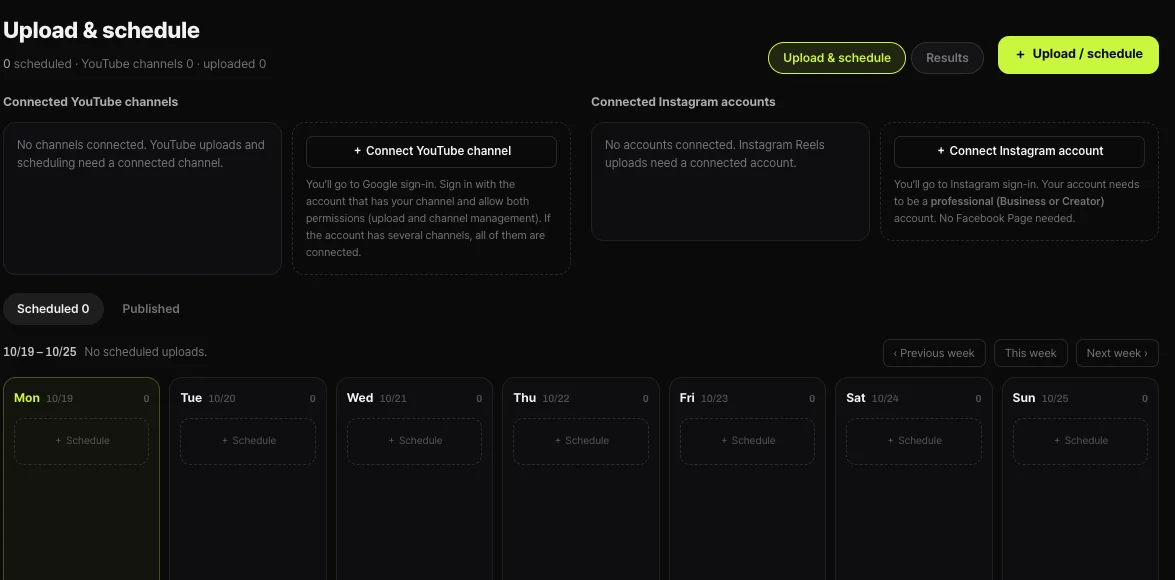
In Shortsmith you can pick several themes from one video to make several videos at once, and upload several of your own videos together to edit, which suits batch production. Afterward, the Upload and schedule screen lets you add schedules by weekday on a calendar for your connected YouTube channel and Instagram account, filling a week at a time.
The help page gives no evidence that a certain weekday or hour gets more views, so choose a frequency you can keep up for a long time and check it against viewer activity in YouTube Analytics.
Key points
An upload schedule starts from frequency, consistency and goals, not the hour. Seven lines:
- Review frequency, consistency and content volume first.
- A frequency you can sustain is the standard.
- Compare cost, revenue and production time by format.
- Choose a goal (revenue, subscribers or reach) and fit the content direction.
- Include holidays, launches, collaborations and breaks.
- Fill gaps with Shorts, live streams and community polls.
- Automate with batch production and scheduled uploads.
How to check whether the help pages have changed
YouTube Help updates its documents whenever a feature changes, and translations lag by language, so the Korean and English versions can differ slightly. The figures and conditions here come from pages read on November 9, 2026 and may have changed since.
Before making an important decision, open the original links under Sources and compare them with what you see now. Eligibility rules and numbers change most often. If a menu name looks different, look for a similar item in the same place; if it is missing, the feature may not be enabled for your account yet. Statements about Shortsmith reflect its screens and code as of November 2026.
FAQ
How often should I upload each week?
The help page gives no number; it says to choose a frequency you can sustain.
Is a certain weekday better?
The help page does not say so. It stresses consistency and sustainability.
Should the schedule be only videos?
No. You can include Shorts, live streams and community poll posts.
What about content that is hard to plan?
News and vlogs have limits, so batch shoot videos where you can to reduce the load.
How do I automate uploads?
Schedule videos in Studio and they go public at the set time.
Sources
- Upload schedule tips — YouTube Help · checked
- Understand your YouTube content performance — YouTube Help · checked