Before you rename a YouTube channel: the 2-changes-in-14-days limit, verification badge and image specs (November 2026)
Shortsmith team · Updated
As a channel grows, its direction changes and the name or handle starts to feel wrong. But these are not settings you can keep flipping. There is a limit on how often you can change them, a rename removes the verification badge, and an old handle can be taken by someone else after 14 days.
This guide is based on three YouTube Help pages read on November 3, 2026: “Manage your YouTube channel’s profile”, “Manage your channel branding” and “Change, view, or hide your handle”. How to create a channel is in our channel-creation guide; here we cover only the limits and specs for editing a channel you already have.
What you change, and where
| Item | Where | Limit to know |
|---|---|---|
| Channel name | Studio, Customization, Profile | Twice in 14 days; a rename removes the verification badge |
| Handle | Same Profile screen | Twice in 14 days; the old handle is held for 14 days |
| Profile picture | Profile, Change | JPG, GIF, BMP or PNG, up to 15MB |
| Banner image | Profile, Change | Up to 6MB; at least 2048 x 1152 to upload |
| Video watermark | Profile, Video watermark | Square, at least 150 x 150, under 1MB |
Changing the channel name
The name must follow the Community Guidelines, and it can take a few days to show everywhere after you change it. Your channel name and picture appear on YouTube only; your Google Account name and picture are changed separately. If the update will not go through, check whether a channel name translation exists and delete it first.
The easiest thing to overlook is the verification badge: changing the name removes it. If your channel has a badge, read our verification badge guide before you rename.
- Sign in to YouTube Studio and choose Customization, then Profile, from the left menu.
- Enter the new channel name.
- Click Publish.
A handle change can be undone
A handle is a unique identifier and can be changed twice within 14 days. After a change your previous handle is held for 14 days so you can switch back, and during that time both the old and new URLs work. Afterward the old handle becomes available for other users to pick. If you have shared the old handle URL anywhere, list those places before you change it.
If your preferred handle is unavailable, try adding periods, numbers or underscores. If it still fails, another channel already uses it or it breaks the handle naming guidelines. There is no way to hide only the handle; Help says to delete or hide the channel.
Picture, banner and watermark specs
- Profile picture: JPG, GIF, BMP or PNG (no animated GIF), up to 15MB. It renders at 98 x 98 pixels, so choose an image that still reads when small. It can take a few minutes to update.
- Banner: upload at a 16:9 ratio, at least 2048 x 1152 pixels. Text and logos stay uncropped inside 1235 x 338 pixels, and 2560 x 1440 is recommended if TV matters. Keep the file under 6MB and add no shadows, borders or frames. The same image is used on computers, phones and TVs but is cropped differently.
- Watermark: choose to show it at the end of the video (15 seconds), from a custom start time, or for the whole video. It must be a square image of at least 150 x 150 pixels and under 1MB. It does not show on videos set as made for kids and cannot be clicked on phones.
Keep banner text central
Edges are cropped differently on each device, so keep text and logos inside the 1235 x 338 safe area.
Translations, pronouns, contact and links
In the Studio Profile screen, Add language lets you add translations of the channel name and description so your videos can reach a global audience: choose the original language, then the translation language. Pronouns can be added (up to four) and shown to everyone or only to subscribers, but the feature is not available everywhere or on Workspace and supervised accounts.
An email under Contact info lets others reach you about business questions, and up to 14 profile links can be shown on the Home tab, with the first one displayed near the subscribe button. Addresses typed into Shorts descriptions are not clickable, so see our Shorts links guide for using the profile link instead.
A checklist before you change anything
- Check whether renaming will remove a verification badge. If you have one, you may prefer not to rename.
- Count how many times you changed the name and handle in the last 14 days. Two is the limit for each.
- List where the old handle URL is shared: business cards, bios, other social profiles.
- Make sure no channel name translation is left over.
- After publishing, give the new name a few days to appear everywhere.
If you use Shortsmith
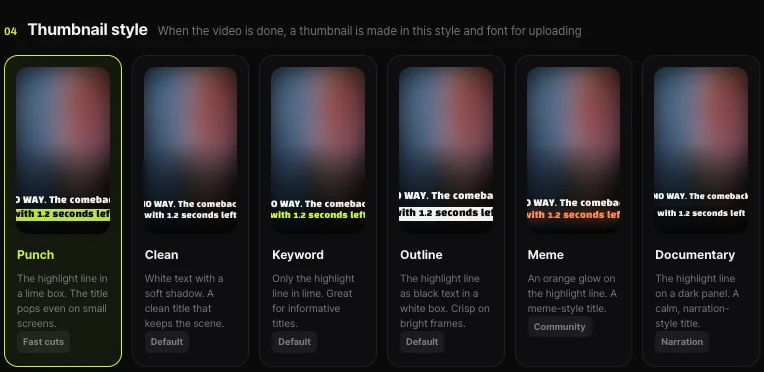
Shortsmith makes videos and posts them to your connected channel; it cannot change the channel’s name, handle, picture or banner. Those are all done in YouTube Studio. If you want a consistent look, you can unify colors and lettering on the video side: Shortsmith’s Create screen offers six thumbnail templates (Punch, Clean, Keyword, Outline, Meme and Documentary).
FAQ
How many times can I change my channel name?
Twice within 14 days. Changing it removes your verification badge.
Can I undo a handle change?
Yes. The previous handle is held for 14 days and both URLs work during that period. After 14 days someone else can take it.
Does my Google Account name change too?
No. The channel name and picture change on YouTube only; the Google Account name and picture are changed separately.
My banner looks cropped.
Keep text and logos inside the 1235 x 338 pixel safe area. Edges are cropped differently on each device.
Does the watermark appear on every video?
Not on videos set as made for kids, and it cannot be clicked on phones.
Can I rename my channel from Shortsmith?
No. Name, handle, picture and banner are changed only in YouTube Studio.
Sources
- Manage your YouTube channel’s profile - Computer — YouTube Help · checked
- Manage your channel branding - Computer — YouTube Help · checked
- Change, view, or hide your handle - Computer — YouTube Help · checked