After a YouTube Partner Program rejection: reapplying and appealing (October 2026)
Shortsmith team · Updated
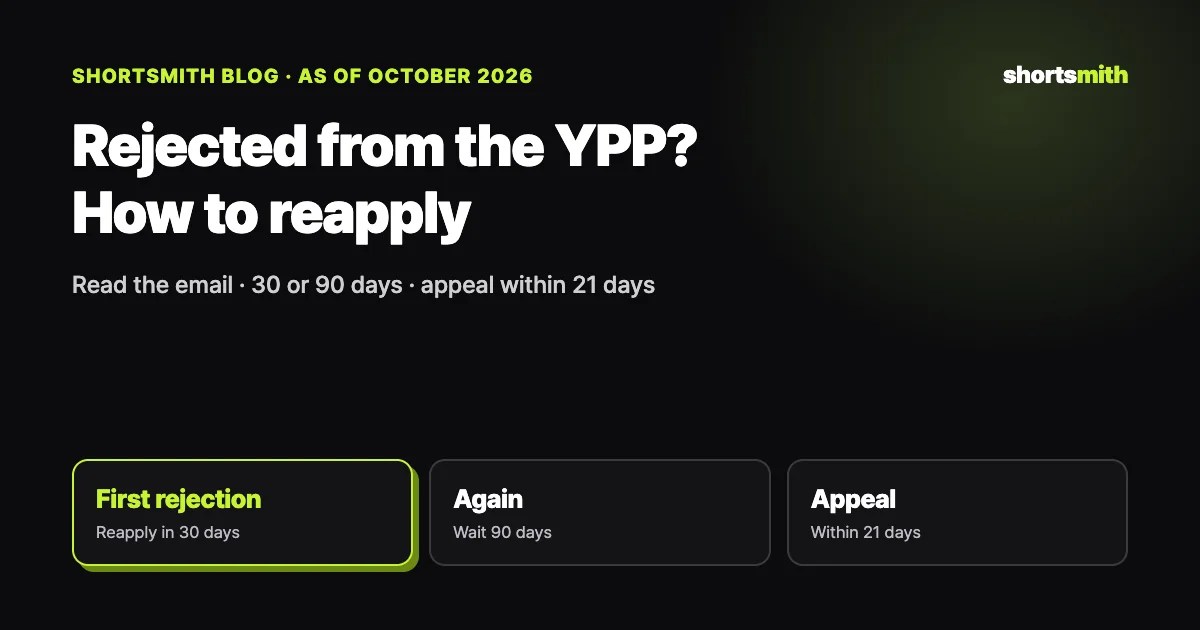
If your YouTube Partner Program application is rejected, start with the policies named in the rejection email. YouTube describes a rejection as reviewers believing a significant portion of your channel doesn’t meet its policies and guidelines, and the email lists the specific policies involved. After a first rejection you can reapply 30 days after the email, after later rejections 90 days, and if you think the decision was wrong you can appeal within 21 days.
We checked YouTube Help’s “My channel was rejected for monetization FAQs,” “Appeal a YouTube Partner Program suspension or application rejection” and “YouTube Partner Program overview & eligibility” on October 22, 2026.
What happens after a rejection, at a glance
| Situation | When | Notes |
|---|---|---|
| Reapply after a first rejection | 30 days after the rejection email | Fix or delete problem videos meanwhile |
| Reapply after later rejections | 90 days after the rejection email | Also 90 days if you’ve reapplied before |
| Appeal | Within 21 days, regardless of attempts | Unlisted video under 5 minutes; decision within 14 days |
| If the appeal is rejected | Reapply 90 days after that date | — |
| Review time | About a month | Can be delayed when volume is high |
Read the rejection email first
A rejection isn’t about missing subscribers or watch hours, which you already met before applying; it’s about channel content not meeting policy. The rejection email says which policies were involved, so start there. For Shorts channels, common ones are reused content, other people’s content reposted without significant change, and repetitious content that looks mass-produced from the same template.
A rejection is a judgment about a significant portion of the channel, not a few videos. Fixing only your latest uploads may not be enough, and titles, descriptions, thumbnails and tags need a look too, not just the videos.
What to fix before reapplying
YouTube suggests reading the policies named in the email, reviewing your videos, titles, descriptions, thumbnails and tags against the monetization policies and Community Guidelines, and editing or deleting videos that don’t comply. If you were rejected for reused content, start by finding Shorts that use other people’s footage almost as-is and make them private or delete them.
Going forward, your contribution needs to be clear. Instead of stitching source scenes together, add commentary that explains why each moment matters and a story that ties them together. Videos stamped out daily from the same template can also look repetitious, so vary topics and structure. You can track your application in the Earn section of YouTube Studio.
Appealing when you think the rejection was wrong
If you believe the rejection was a mistake, you can appeal within 21 days no matter how many times you’ve applied. Submit a video appeal in YouTube Studio or contact Creator Support. The video should be under 5 minutes and unlisted, show your channel URL within the first 30 seconds, and keep appeal details out of the description.
In the video, show what your channel makes and which parts are your own creative work. Walking through your real workflow, how you choose sources, what you add and how you edit, helps. YouTube says it responds within 14 days, and if the appeal isn’t accepted you can reapply 90 days later.
Using the waiting period well
The 30 (or 90) days before you can reapply are time to rebuild the channel. Sort your videos into ones you made from scratch, ones that add commentary to others’ footage, and ones that are nearly straight copies. If the last group is large, making those private is the place to start.
Then show the channel’s direction with new videos. Post videos with clear commentary and story steadily, and at the next review a significant portion of the channel will be videos that meet the policies. Posting consistently to the standard beats rushing out lots of videos right after a rejection.
Before reapplying, reread the policies in the rejection email and check that both your fixed and new videos meet them. If you’re rejected again for the same reason, the next wait is 90 days.
Eligibility and the 2027 terms update
To earn ad revenue you need 1,000 subscribers plus either 4,000 valid public watch hours in the last 12 months or 10 million valid public Shorts views in the last 90 days. Watch hours from the Shorts feed don’t count toward the 4,000 hours. You also need no active Community Guidelines strikes, 2-Step Verification on your Google Account, advanced features access and a linked AdSense account.
According to YouTube, updated Partner Program terms take effect February 1, 2027, and creators who want to keep monetizing must accept them in YouTube Studio by January 31, 2027. Check the Earn section’s notices while you prepare to reapply.
Making Shorts with clear contribution in Shortsmith
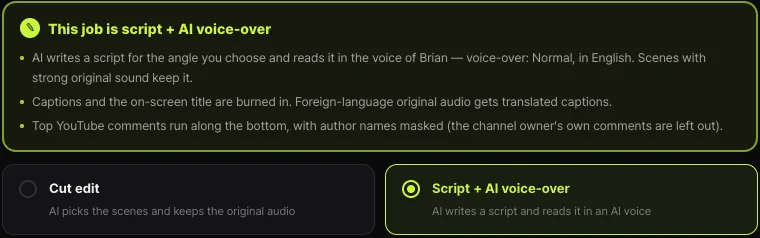
Shortsmith has two job types: Cut edit and Script + AI voice-over. Cut edit picks scenes and keeps the original audio, which suits your own videos or sources you have permission to use. When making Shorts from other people’s videos, Script + AI voice-over adds commentary explaining reasons, meaning and results, which lowers reused-content risk.
Scripts alternate a narration line with the original audio and are written to avoid retelling scenes in order like play-by-play. You can pick different angles from the same video to make several distinct Shorts, which also reduces repetition. Monetization review looks at your whole channel, though, so source rights and channel makeup are still the uploader’s responsibility.
FAQ
When can I reapply after a rejection?
30 days after the rejection email for a first rejection, and 90 days after for later ones.
Where do I see why I was rejected?
The rejection email names the policies involved. For Shorts channels, reused and repetitious content are common.
How long do I have to appeal?
21 days, regardless of how many times you’ve applied. YouTube says it responds within 14 days.
How do I make the appeal video?
Under 5 minutes and unlisted, with your channel URL visible in the first 30 seconds and no appeal details in the description.
How long does review take?
About a month, and longer when application volume is high.
Do Shorts feed watch hours count toward 4,000 hours?
No. To qualify through Shorts, use the 10 million Shorts views in 90 days path.
Do I have to delete the problem videos?
YouTube suggests editing or deleting videos that don’t meet the policies named in the email. Start with Shorts that reuse others’ footage almost as-is.
Sources
- My channel was rejected for monetization FAQs — YouTube Help · checked
- Appeal a YouTube Partner Program suspension or application rejection — YouTube Help · checked
- YouTube Partner Program overview & eligibility — YouTube Help · checked
- YouTube channel monetization policies (reused content) — YouTube Help · checked