When other people appear in your video, or you appear in someone else’s: YouTube’s privacy guidelines (November 2026)
Shortsmith team · Updated
Street footage, interview clips and comment screenshots all contain other people. Shorts are short and easy to post, but for the person on screen it means their face, voice and name become public. YouTube handles this through its privacy guidelines and tells creators to get permission before filming.
This guide is based on the YouTube Help pages “Protecting your identity” and “Other reporting options”, read on November 3, 2026. It covers both sides: the creator who films people, and the person whose video someone else posted. For anything needing legal judgment, the official page and professional advice come first.
Ask the uploader first
If someone posted your personal information or uploaded a video of you without your knowledge, YouTube says to ask the uploader to remove it first. If you cannot reach an agreement, or are uncomfortable contacting them, you can use the privacy complaint process to ask YouTube to remove it. If you are the creator receiving such a request, responding quickly is usually the way to keep a dispute from growing. That is our opinion.
What YouTube looks at
The key is whether the person is uniquely identifiable. A face need not be visible: a voice, name or contact details shown with it can identify someone. A passer-by in a crowd who cannot be singled out may not qualify. A complaint does not automatically mean removal.
| Item | Detail |
|---|---|
| Who can complain | The person must be uniquely identifiable, and they or their legal representative must file |
| Identifying factors | Image or voice, full name, financial information, contact information, other personal details |
| Weighed in the decision | Public interest, newsworthiness, consent, and whether the video shows a moment of death or critical injury |
| Deceased people | On verification of death, requests from the closest family or legal representatives are considered |
AI videos that copy your face and voice
If someone used AI to alter or create content that looks or sounds like you, you can ask for it to be removed. To qualify, the content must depict a realistic altered or synthetic version of your likeness. When evaluating, YouTube considers the following.
- Whether the content is altered or synthetic
- Whether it is disclosed to viewers as altered or synthetic
- Whether the person can be uniquely identified
- Whether the content is realistic
- Whether it contains parody, satire or other public interest value
- Whether it features a public figure or well-known individual in sensitive behavior such as criminal activity, violence, or endorsing a product or political candidate
What creators should do before posting
- Get permission from people before you film them. This is the first privacy tip YouTube lists.
- Check that names, contact details, neighborhoods, schools or home addresses that could identify someone do not appear on screen or in captions.
- When you show someone else’s comment or message, hide the name.
- If a request arrives, do not react emotionally; first decide whether to cut that segment or take the video down.
- Protect your own account with 2-step verification and do not be fooled by anyone posing as YouTube staff asking for your password. YouTube employees never ask for it.
Take extra care with minors
Videos with children involve both permission and the audience setting. Our made-for-kids guide covers that setting.
How the other reporting routes differ
YouTube provides several routes for when a video report alone cannot capture the problem. Reporting a channel suits flagging several videos or comments and giving extra context, and Help says it is especially useful if you are being cyberbullied. Privacy complaints use a dedicated process, and the information you submit is protected during handling. Legal issues go through the legal web form, which Help says is investigated faster than fax or mail, and misusing it can get an account terminated.
If you use Shortsmith
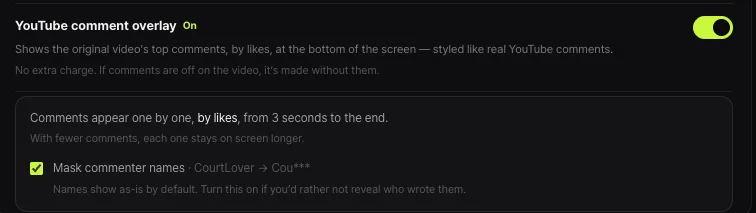
Shortsmith has an option that floats popular comments from the source video along the bottom of the screen, with a setting that masks the author’s name. A commenter can be a uniquely identifiable person, so masking is the safer choice for videos that use comments. According to the option’s description, comments by the channel owner are left out.
Shortsmith edits source footage; it cannot obtain permission from the people in it. If you are worried about someone or personal information in the source, not using that section is the surest answer.
FAQ
Should I contact the uploader first?
YouTube says to ask the uploader for removal first. If you cannot agree or are uncomfortable, use the privacy complaint process.
Can I complain if my face is not visible?
If you are uniquely identifiable by factors such as voice, name, financial or contact information, it can still qualify.
Can someone else file for me?
The person or their legal representative must file. For someone who has died, requests from the closest family or legal representatives are considered once the death is verified.
Does a complaint always lead to removal?
No. YouTube weighs public interest, newsworthiness, consent and similar factors.
Can I report a fake AI video of me?
Yes, if it shows a realistic altered or synthetic version of you. It is assessed against factors such as parody.
Does Shortsmith show commenter names?
It has a setting to mask author names. For footage with people in it, check the source yourself.
Sources
- Protecting your identity — YouTube Help · checked
- Other reporting options — YouTube Help · checked