Where YouTube draws the line on impersonation: fan channel labels, AI voices and how to report (November 2026)
Shortsmith team · Updated
A lookalike of a popular channel confuses viewers and hurts the original creator. YouTube handles this under its impersonation policy. This guide goes both ways: how to avoid imitating another channel by accident, and where to report when your own channel is copied.
It is based on four YouTube Help pages read on November 3, 2026: “Impersonation policy”, “Report inappropriate videos, channels & other content on YouTube”, “Other reporting options” and “Verification badges on channels”. How to rename a channel and its limits are in the previous guide.
What the policy treats as impersonation
Help’s examples include putting “real” or “official” in a channel name to look like the authentic version, adding words such as “backup”, “Shorts” or “live” to pose as a backup channel, using AI to make a celebrity appear to endorse a product, and passing off a fake speech as real.
- Using typos, special fonts or extra punctuation to make viewers think you are another creator or entity
- Copying a profile picture, banner or particular color scheme to pose as an existing channel. If the intent to imitate is clear, it counts even when it is not 100% identical.
- Using someone’s AI-generated likeness or voice to falsely suggest they own or endorse your channel’s content
- Comments that make people think you are another person or entity
- A channel name or handle that is phonetically identical or visually similar to an existing entity, including clever misspellings
How a fan channel must label itself
If you run a fan channel, you must say so in the channel name or handle. Viewers should be able to tell clearly that the channel does not represent the original creator, artist or entity. Reading that strictly, a small note buried in the description is probably not enough; that is our interpretation.
Copying someone else’s video and re-posting it as yours with no change or meaningful original commentary is also listed as an example. If you run a highlight or clip channel, name the source channel and add your own commentary or editing.
Words better kept out of a name
Words such as real, official, backup and live are named in the policy’s examples because they read as an authentic version or a spare channel.
When your channel is impersonated
A channel report can cover the profile picture, channel art or the user. One catch: YouTube does not review the channel’s individual videos when you report a channel. It looks at channel-level features such as the profile picture, handle and description, so report a specific video separately if you think it violates policy. Reports are anonymous, and a report alone does not take content down automatically.
If YouTube decides a channel was made to impersonate another person or entity, it may remove the channel to protect the community. The policy also says YouTube enforces trademark holders’ rights.
- Sign in to YouTube and go to the suspect channel’s page.
- In the channel description, click …more and then Report user.
- Pick the reason that fits best and click Next, adding details if you wish.
- Click Submit.
AI videos that copy your face or voice
If you find your personal information, a video of you, or AI-generated content imitating your appearance or voice posted without consent, you can request removal under YouTube’s privacy guidelines. Help says it weighs factors such as whether the material is parody or satire and whether it features a public official or well-known individual. Privacy complaints and legal reports are separate processes from channel reports.
The detection feature for creators worried about their likeness is covered in our likeness detection guide.
Verification badges and impersonation
A verification badge helps tell an official channel from similarly named ones. To apply you need 100,000 subscribers, 2-step verification and a complete profile. Changing the channel name means the channel does not keep its verified status and must apply again, whereas changing the handle does not remove the badge. Help also says channels that deliberately impersonate other creators can face further action.
Keeping your own channel from being mistaken
- Search whether your channel name and handle sound or look like an established channel.
- Check that your profile picture and banner do not resemble another channel’s colors and layout.
- If it is a fan channel, say so in the name or handle.
- When using someone else’s video, credit the source and add your own commentary or editing.
- Do not make content that imitates a famous person’s face or voice with AI.
If you use Shortsmith
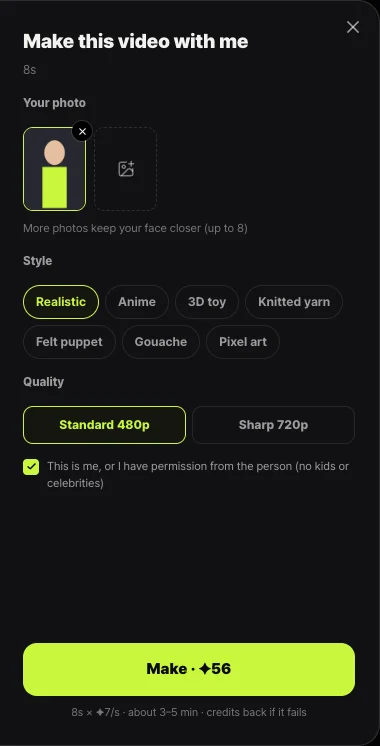
Shortsmith’s viral motion feature asks you to confirm the photo is yours or that you have permission before it makes a video, and it says photos of children and famous people cannot be used. That fits the aim of not creating impersonation problems. The example videos on Shortsmith’s home page also credit the original creator and license on each card.
FAQ
Are fan channels allowed?
Yes, but the name or handle must make clear that the channel does not represent the original creator.
Is a similar profile picture impersonation?
If the intent to imitate is clear, it counts as channel impersonation even when it is not 100% identical.
Does reporting a channel review its videos?
No. Channel reports look at features such as profile picture, handle and description. Report a specific video separately.
Is my report anonymous?
Yes. Content reports are anonymous, so other users cannot see who reported.
Does changing my handle remove my verification badge?
No. Changing the channel name does, but changing the handle does not.
What can I do about an AI copy of my voice?
You can request removal under the privacy guidelines. Requests are weighed against factors such as whether the content is parody.
Sources
- Impersonation policy — YouTube Help · checked
- Report inappropriate videos, channels & other content on YouTube — YouTube Help · checked
- Verification badges on channels — YouTube Help · checked