YouTube age restriction explained — profanity, violence, nudity, dangerous acts and child safety, how to check it and how to appeal (October 2026)
Shortsmith team · Updated
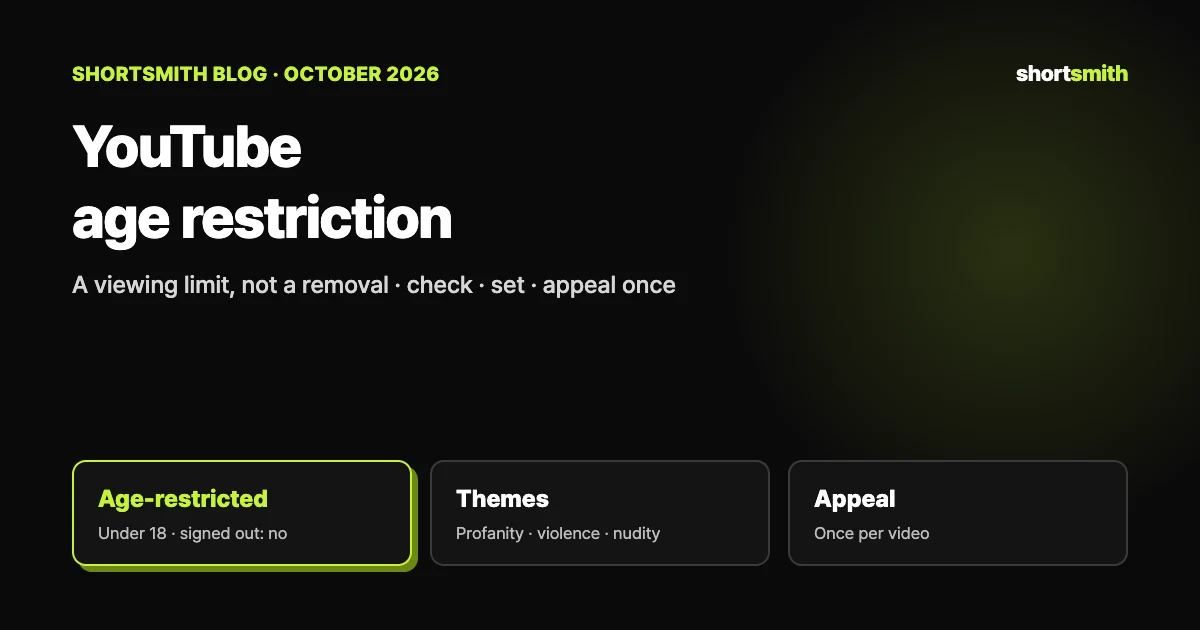
An age restriction is not a removal. It is a viewing limit YouTube puts on a video that follows the Community Guidelines but isn’t appropriate for viewers under 18. Once it’s applied, people under 18 and signed-out viewers can’t watch the video, it won’t play on most third-party sites, and a warning screen shows before it plays. Ads can still run, but depending on the advertiser, earnings may be limited.
This guide is based on YouTube Help’s “Age-restricted content”, “Appeal the age restriction on your video”, “Watch age-restricted videos” and “Upload YouTube videos”, plus the Child safety, Harmful or dangerous content, Violent or graphic content, Nudity & sexual content and Vulgar language policies, checked on October 29, 2026. The examples in the policies are only some of the cases, so if you are unsure, fix the video before you upload it.
What it is — a viewing limit, not a removal or a strike
According to YouTube, an age restriction applies to content that doesn’t violate the Community Guidelines but may be incompatible with the Terms of Service or not appropriate for viewers under 18. It covers videos, video descriptions, custom thumbnails, live streams and any other YouTube product or feature.
So it is defined as a step for content that isn’t violating, separate from a strike; the Vulgar language policy also lists “age restriction, content removal, or a strike” side by side as outcomes. That said, the same material at a higher level of severity can lead to removal or a strike instead.
- Viewers under 18 and signed-out users can’t watch it.
- On most third-party websites the embedded video won’t play and sends viewers to YouTube, where they must sign in and be over 18.
- A warning screen shows before the video plays; viewers 18 or older can continue.
- To keep people from stumbling on it by accident, it isn’t shown in certain sections of YouTube.
- In Australia, the EU, the EEA, Switzerland and the UK, viewers may be asked to verify their age.
It’s separate from “made for kids”
YouTube says your “made for kids” setting won’t affect age restrictions on your videos. Marking a video as made for kids doesn’t lift an age restriction, and not marking it doesn’t trigger one. If anything, videos meant for adults that could easily be confused with family content — including cartoons with adult themes such as violence, sex or death — are the candidates.
The five themes that can get a video age-restricted
YouTube points to five areas. It stresses that the examples are not a complete list, so use the table to get a feel for the lines rather than as a checklist.
| Theme | Age-restriction examples (from YouTube) | Question to ask before uploading |
|---|---|---|
| Child safety | Adults doing dangerous activities minors could easily imitate (handling explosives, challenges that cause bodily injury); videos meant for adults that could easily be confused with family content | Could a child copy this? Does an adult video look like family content? |
| Harmful or dangerous acts | Fake harmful pranks so real that viewers can’t tell the difference; promoting a cannabis dispensary | Can viewers tell it’s staged? |
| Nudity and sexually suggestive content | Provocative dancing or fondling that invites sexual activity; a pose meant to sexually arouse the viewer; clothing unacceptable in public contexts, such as lingerie | Is a body part the focal point of the frame? |
| Violent or graphic content | Showing a major road accident’s injured survivors; focusing solely on the most graphically violent part of a film or video game | Is the violence the center of the video or part of the context? |
| Vulgar language | Heavy profanity in the title, thumbnail or metadata; a compilation or clips of profanity taken out of context | Do the title and thumbnail contain swearing? Is it a profanity-only cut? |
When a video is restricted instead of removed — context decides
The same subject can be removed or age-restricted depending on context. For content showing a dangerous act, YouTube says it may restrict rather than remove if the video meets one or more of the criteria below.
- It has educational, documentary, scientific or artistic context — for example, what injuries the act can cause, what precautions or training make it safe, or your own experience being injured. Saying “Don’t try this at home” is not sufficient context.
- The act shown does not risk serious injury.
- The content does not promote the act — promotion includes encouragement or praise as well as instructions on how to do it.
Five age-restriction examples YouTube gives for dangerous acts
Prank content in which adults use excessive fake blood or gruesome fake injuries; footage of a dangerous challenge with commentary on how many people were seriously injured; adults misusing fireworks; adults using tasers on willing participants or themselves; and an adult parkour athlete reacting to highly dangerous amateur stunts and commenting on the risk of harm.
What each policy weighs
The violence, nudity and vulgar language policies list the factors YouTube considers when deciding whether to allow, age-restrict or remove. YouTube says each list is incomplete.
| Policy | Factors considered |
|---|---|
| Violent or graphic content | Whether violent or gory imagery is the focus / whether the title, description or tags show an intent to shock or disgust / whether imagery or audio is blurred or masked / how long the violence is on screen / whether context shows it is dramatized or fictional / whether it is part of a religious or cultural practice / whether it uses real human actors or animation, including video games |
| Nudity and sexual content | Whether clothed or unclothed breasts, buttocks or genitals are the focal point / whether the pose is meant to sexually arouse / whether the language is graphic or lewd / whether actions encourage sexual arousal / whether clothing would be unacceptable in public, such as lingerie / whether sexual imagery or audio is blurred or masked / whether it is fleeting or prolonged / whether it invites others into a challenge involving sexual acts |
| Vulgar language | Sexually explicit language or narratives / excessive profanity / heavy profanity or sexually suggestive terms in the title, thumbnail or metadata / excessive sexual sounds |
Real actors vs animation or games, and context inside the video
YouTube separates dramatized violence with real human actors from animation and video games. Dramatized violence with real actors is more likely to be age-restricted, especially if it is graphic or realistic, while violence that is clearly fictional, as in animation or games, generally isn’t removed. To use violent or graphic content for educational purposes, the context has to be in the video’s own images or audio (for public-interest footage such as war or disasters, the title and description are considered too).
What it means for ad earnings
Age-restricted videos can still earn from ads. But some advertisers prefer family-friendly content or content without the themes above, so a video may have limited or no ad earnings. If your channel is eligible for ads, YouTube says to review the advertiser-friendly content guidelines too.
An age restriction decides who can watch, while the yellow icon (limited ads) tells you how ads run on the video — they are two different markers.
How to check whether a video is age-restricted
YouTube says its systems are constantly updated, so if they find a discrepancy with your rating, the status could change later. Check the Content list right after you publish and again after some time has passed.
- Sign in to YouTube Studio on a computer and open Content in the left menu.
- Use the “Age-Restriction” filter, or look for “Viewable by 18+” under Notices on the video’s row.
- As a viewer who is 18 or older and signed in, you can also see it below the video description.
Appeals — you get one
After you submit, the YouTube team reviews the request and takes further action if appropriate. What to write is easiest to organize around what the policies weigh. For a dangerous act, that is the educational or documentary context and the fact you don’t promote it; for violent scenes, how much of the video they take up and the context; for profanity, whether it appears in the title or thumbnail and the video’s main purpose. This is our summary of the policies, not a guarantee of the result.
- Sign in to YouTube Studio and select Content in the left menu.
- Go to the video you want to appeal.
- Hover over the Notice and click “Review and take action”.
- Enter your reason for appealing and click Submit.
One chance only
You can appeal the age restriction on a video only one time. Give the context and your reasons in detail in that first appeal.
Setting it yourself — for videos made for adults
If a video is meant for adult audiences, YouTube says you can age-restrict it yourself when you upload. On a computer, choose Create → Upload videos, add the file, and use “Age restriction” under “Audience” in the Details step. When a video could be confused with family content, such as a cartoon with adult themes, restricting it yourself makes things clearer for viewers.
Videos with minors have their own limits
The Child safety policy says that content depicting children or uploaded by minors can have some features turned off at the channel and content level to protect minors, even when it doesn’t violate any policy. That is separate from an age restriction, and the features it names include comments, live chat, live streaming, video recommendations, posts, Shorts, video remixing and views from signed-out users. If you plan to post family videos as Shorts, read that list first.
Three things to watch with commentary Shorts
When you pick a source video and add commentary, which scenes you choose becomes part of what’s judged. Here are three patterns the policies name directly.
- Don’t collect only the most extreme scenes — “focusing solely on the most graphically violent part of a film or video game” and “a compilation or clips of profanity taken out of context” are listed as age-restriction examples. A best-moments compilation made only of violent or swearing scenes follows the same pattern.
- Check the severity of titles, thumbnails, descriptions and tags — even if the video itself is mild, heavy profanity in the title or thumbnail can trigger it, and the violence policy also looks at whether titles, descriptions or tags show an intent to shock or disgust.
- Don’t assume a game video is safe — animation and games are clearly fictional and often avoid removal, but a video that focuses solely on the most graphically violent part of a game is still an age-restriction example.

When you make and post with Shortsmith
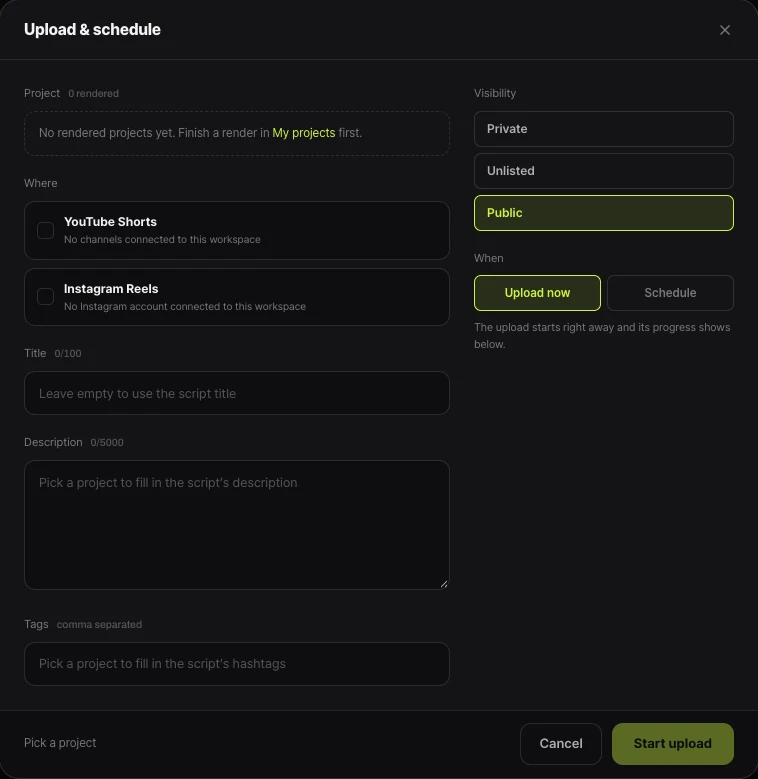
Shortsmith’s Upload & schedule window has fields for visibility (Private, Unlisted, Public) and the upload time, but no “Age restriction” or “Audience (made for kids)” field. Shortsmith also doesn’t judge profanity, violence or nudity in a video and apply an age restriction for you, so checking and setting it happens in YouTube Studio.
If a video looks like it needs an age restriction, set Visibility to Private in the upload window, post it, set the age restriction in Studio, then make it public. Shortsmith’s scheduled upload posts at the chosen time rather than sitting on YouTube in advance, so it leaves no window to edit first.
If you want to tone things down from the start, write something like “no swearing, keep it plain” or “keep injury scenes short” in the “Brief for the AI” box on the New project screen. The AI reads that box before analysis and reflects it in research, themes and the script. The call on what to upload is still yours.
FAQ
Does an age restriction add a strike to my channel?
It is defined as a step for content that doesn’t violate the guidelines, separate from a strike. But the same material at a higher level of severity can lead to removal or a strike.
Who can watch an age-restricted video?
Only signed-in viewers who are 18 or older. Users under 18, signed-out users and most third-party embeds can’t, and a warning screen shows before it plays.
Can an age-restricted video earn ad revenue?
It can earn from ads, but depending on the advertiser, earnings may be limited or absent. Review the advertiser-friendly content guidelines too.
How many times can I appeal?
Once per video. In Studio Content, hover over the Notice and choose “Review and take action”.
Does marking a video as made for kids lift the age restriction?
No. YouTube says the two settings don’t affect each other.
Can I set an age restriction in Shortsmith’s upload window?
There’s no such field. Upload as Private, set the age restriction in YouTube Studio, then make the video public.
Sources
- Age-restricted content — YouTube Help · checked
- Appeal the age restriction on your video — YouTube Help · checked
- Watch age-restricted videos — YouTube Help · checked
- Upload YouTube videos — YouTube Help · checked
- Child safety policy — YouTube Help · checked
- Harmful or dangerous content policy — YouTube Help · checked
- Violent or graphic content policies — YouTube Help · checked
- Nudity & Sexual Content Policy — YouTube Help · checked
- Vulgar language policy — YouTube Help · checked