High click-through but few impressions? Benchmarks, spotting clickbait and why views can exceed impressions (November 2026)
Shortsmith team · Updated
Open Analytics and impressions and click-through rate are what you see first, and a low number makes you want to change the thumbnail. But YouTube Help spells out when to look at CTR, how to read it and what not to do. It advises against reacting to small swings or swapping thumbnails on the same video to compare them.
This guide is based on the YouTube Help pages “Impressions & click-through-rate FAQs” and “Understand your YouTube video reach”, read on November 6, 2026. Retention metrics for Shorts are in our analytics guide and thumbnail design in our thumbnail guide.
What impressions CTR is
Impressions click-through rate measures how often viewers watched a video after YouTube registered an impression. Some impressions, such as those on external websites or end screens, are not counted by this metric, so it can represent only part of your total views. The Reach tab’s key metrics card shows impressions, impressions CTR, views and unique viewers, and the traffic source types card shows where views came from.
CTR varies by content type, audience and where the impression appeared. A thumbnail always competes with other videos on Home, Up next, search results and the subscriptions feed.
The benchmark and how to read it
So compare a video’s CTR over a long period and understand how traffic sources affect it, rather than reading one number in isolation.
| Situation | What YouTube says |
|---|---|
| Typical range | Half of all channels and videos have an impressions CTR between 2% and 10% |
| Can exceed the range | Channels under one week old, new videos, and videos with under 100 views |
| Low CTR can be natural | Videos with many impressions, for example shown on Home |
| CTR can run higher | Videos whose impressions mostly come from sources such as your own channel page |
Three things not to do with CTR
- Decide without enough data: look after substantial impressions. Do not check CTR right after uploading.
- Chase small changes: small fluctuations are normal and need no immediate action. Consider improving only if the change is statistically meaningful.
- Test several thumbnails or titles on one video: it is hard to show each to the same audience, and CTR differences may come from traffic sources rather than the thumbnail or title.
Why CTR is high but impressions are low
Creators compare videos within their channel, but YouTube’s systems rank each video against every other video a viewer could watch. A video that outperforms the rest of your channel may still be outperformed by videos from other channels. Videos with fewer impressions and views also tend to show higher CTR and average view duration because a small, loyal audience watched them. When comparing videos, remember that the data can reflect differences in audience.
When chasing CTR turns into clickbait
YouTube says it recommends videos that are relevant to viewers and where average view duration shows their interest. Clickbait videos usually have a short average view duration and are therefore less likely to be recommended. If CTR is high but average view duration is short and impressions are lower than expected, the thumbnail can be judged as clickbait. A title or thumbnail that differs from the real content is also “malicious clickbait”, which the spam policy bans.
When the numbers do not add up
- Views exceed impressions: this can happen when lots of traffic comes from outside YouTube. Not every time a thumbnail is shown counts as an impression, and not every view comes from a thumbnail impression.
- CTR differs from your calculation: CTR is based on views from counted impressions, so total views divided by impressions can differ.
- Impressions dropped: videos not suitable for a broad audience can have limited impressions, and ad limits under advertiser-friendly guidelines can reduce revenue too.
A reading order for Shorts creators
- Open the Reach tab after impressions have built up, not right after upload.
- Check the traffic source types card first to see where views came from.
- Read CTR together with average view duration.
- Compare several similar videos over a long period, not one.
- If you change a thumbnail, change one thing at a time and write down the result.
This is our suggestion
The order is not a YouTube procedure. Only the “do not” items and the benchmark come from Help.
If you use Shortsmith
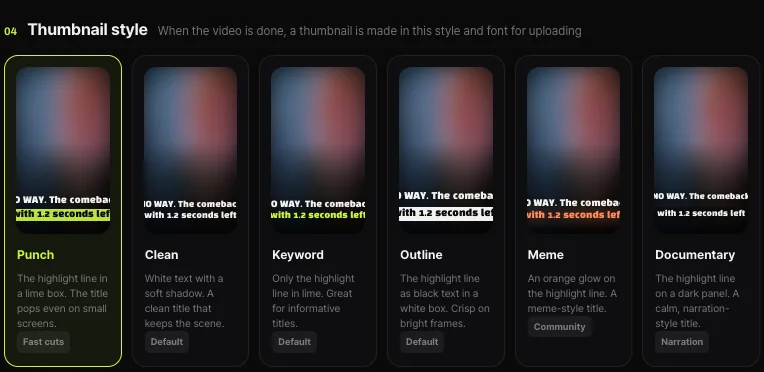
Shortsmith’s Create screen lets you pick a thumbnail template (Punch, Clean, Keyword, Outline, Meme or Documentary). Templates only align color and lettering and do not guarantee any CTR; read your CTR in YouTube Studio analytics. The point of this guide is to avoid putting words on a thumbnail that the video does not deliver.
FAQ
What is an average impressions CTR?
YouTube says half of channels and videos have an impressions CTR between 2% and 10%. New videos or videos with under 100 views can exceed that.
Can I check CTR right after uploading?
It is not recommended. Look after substantial impressions have built up.
Can I test two thumbnails by swapping them?
Not recommended. It is hard to show each to the same audience, and differences may come from traffic sources.
CTR is high but impressions are low.
YouTube ranks a video against every video a viewer could watch. Videos with smaller audiences also tend to show higher CTR and view duration.
Why are views higher than impressions?
Heavy traffic from outside YouTube can cause it, and not every view comes from a thumbnail impression.
Does a Shortsmith template raise CTR?
There is no guarantee. It aligns style, and results are read in Studio analytics.
Sources
- Impressions & click-through-rate FAQs — YouTube Help · checked
- Understand your YouTube video reach — YouTube Help · checked